The enterprise AI industry is currently obsessed with "God Mode" orchestration. The prevailing strategy for building autonomous agents relies on decoupled middleware—API Gateways, LangGraph orchestrators, and centralized hubs like Semantic Kernel.
The architecture usually looks like this: Give a massive Large Language Model (LLM) a static OpenAPI schema of your entire enterprise, connect it via a highly privileged service account, and then rely on external firewalls to tackle the agent when it tries to do something it shouldn't.
This approach creates a massive, expensive problem that is suffocating State-of-the-Art (SOTA) agentic workflows: Context Noise.
When an LLM is forced to act as its own compliance officer, it burns compute and context tokens fighting the enterprise infrastructure rather than solving the user's problem.
At Code On Time, we engineered the Digital Co-Worker to reject this paradigm. By leveraging Identity Projection and a Federated Mesh, we eliminate context noise before the prompt is even processed. Here is how we move enterprise AI from probabilistic guessing to deterministic physics.
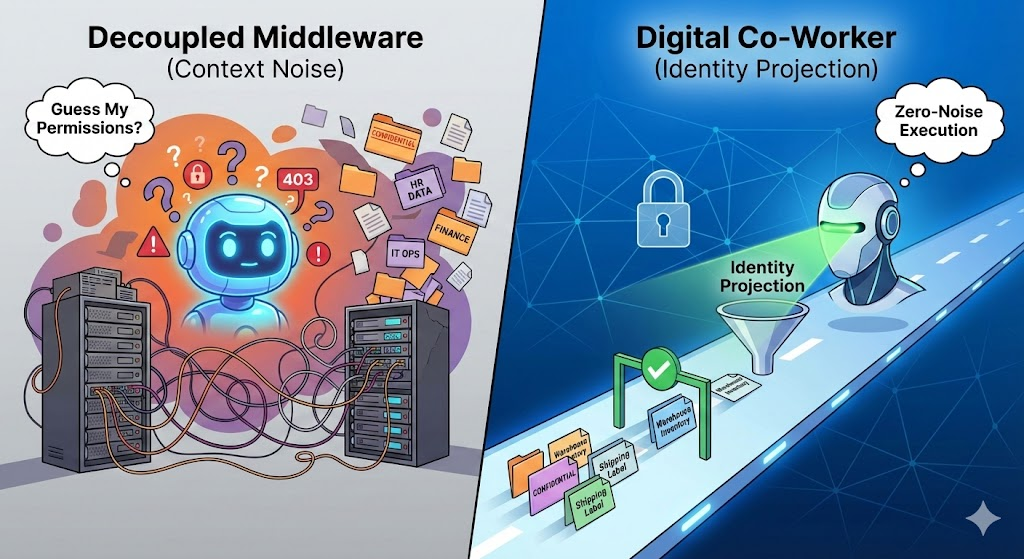
The "Guess My Permissions" Loop
To understand the cure, you must understand the disease. In a decoupled middleware architecture, the LLM is handed a universal instruction manual (the schema) that is completely divorced from the user's actual identity.
Imagine an entry-level warehouse worker asking an AI agent to check inventory. Because the agent's schema is static, it knows the Get_Executive_Financial_Summary tool exists.
- The Attempt: The agent formulates a plan and decides the output of a financial tool would provide useful context. It attempts to call the API.
- The Catch: The AI Gateway or middleware intercepts the call, checks the user's OAuth token, realizes the warehouse worker lacks clearance, and returns an
HTTP 403 Forbidden error.
- The Noise: The LLM now has to spend its next cognitive cycle reading the error, apologizing, hallucinating a workaround, or trying a slightly different forbidden tool.
The context window rapidly inflates with failed attempts, error codes, and recovery reasoning. The agent is trapped in a high-latency game of trial-and-error, trying to discover its own boundaries.
The noise is even worse in Retrieval-Augmented Generation (RAG) setups. If a vector search pulls up a confidential document, middleware must retroactively redact the sensitive data before feeding it to the LLM. The agent receives a disjointed, fragmented text block full of [REDACTED] tags, forcing it to burn tokens trying to piece together a coherent thought.
The Antidote: Two-Tiered Noise Reduction
The distinction between catching an unauthorized action and eliminating the context noise is the defining architectural gap in enterprise AI right now.
The Digital Co-Worker solves this by wrapping the live database and projecting a dynamic REST Level 3 Hypermedia (HATEOAS) API based strictly on the user's identity. This creates a zero-noise environment across two distinct tiers.
Tier 1: Macro-Scope Reduction (The Federated Mesh)
Centralized enterprise hubs usually operate as an "Omni-Agent." When a user opens the chat, the agent must load the schemas for the entire enterprise—Warehouse, HR, IT Helpdesk, and Accounting—just to understand what tools are available. This creates immediate, overwhelming token noise.
We apply Domain-Driven Design (DDD) directly to LLM context management via the Federated Mesh.
By starting the prompt inside a specific domain app (e.g., the Warehouse app built with Code On Time), the initial HATEOAS payload is radically constrained. The LLM is only aware of warehouse-related entities. The agent does not spend cognitive effort distinguishing between a "Warehouse Inventory Record" and an "IT Asset Inventory Record," because the IT domain simply does not exist in its current reality.
Tier 2: Micro-Scope Reduction (Identity Projection)
Once inside the domain, the application dynamically filters the HATEOAS API based on the exact OAuth 2.0 token of the user making the request.
If a janitor and the CEO look at the exact same invoice record, the Digital Co-Worker projects two entirely different realities. If the janitor doesn't have the authority to delete the invoice, the delete link is physically omitted from the JSON payload.
The LLM never burns a single token deciding if it should open a forbidden door, because the door does not exist in its reality. The context window remains pristine, containing only what is mathematically possible and legally authorized for that specific user at that exact microsecond.
The "Domain Hop": Transparent Traversal
Enterprise processes rarely live in silos. A typical Return Merchandise Authorization (RMA) process might require hopping from Customer Service, to the Warehouse, to Accounting.
In decoupled middleware, crossing domains requires heavy orchestration: pausing the agent, negotiating a new token exchange, and injecting a massive new schema.
With the Digital Co-Worker, the "hop" is natively embedded in the web's foundational physics:
- The Bridge: While inspecting a shipment in the Warehouse domain, the state machine encounters a hypermedia link to the Accounting domain.
- The Traverse: The agent executes a standard loopback HTTP
GET request against that URL.
- The Silent Handshake: Because the apps in the Federated Mesh share an in-house OAuth 2.0 Identity Provider (Entra ID, Google, Okta), the request arrives with a token the Accounting Web Application Firewall (WAF) already trusts.
- The Landing: The Accounting app evaluates the token, dynamically projects the permitted data (micro-scope reduction), and returns the pristine new state.
The LLM never orchestrates an authentication flow. It never reasons about network topography. It simply follows a link from one bounded context to another.
Stop Building Brains. Build Better Highways.
The industry is wasting millions trying to build "Smart Drivers" (custom LLMs with massive rulebooks) that inevitably crash on messy enterprise dirt roads.
The Digital Co-Worker provides a "Smart Highway." By offloading identity enforcement and state reduction to the HTTP and API layers, the LLM is freed from acting as a security guard. Its entire token budget is dedicated purely to achieving the user's goal.
You don't need a magical AGENTS.md file to keep your AI on track. You just need solid engineering.