Text your work number. Your alter-ego handles it.
AI (LLM) operates the app's invisible UI as your alter-ego — bound by your permissions, your data, and your business rules. It can't do anything you couldn't do, and it remembers everything it's ever done for you.
Turn your SQL databases and APIs into secure, autonomous agents. The Digital Co-Worker wraps your enterprise data in a "Cognitive Layer" that allows AI to reason, act, and transact safely—without moving your data.
Stop building chatbots. Start hiring Co-Workers.
Most Enterprise AI tools act as "Tourists"—they view your data from the outside through fragile connectors, lack long-term memory, and guess at your business rules. They can answer questions, but they cannot securely do the work.
Code On Time offers a different approach. We transform your existing application into a secure host for a Digital Co-Worker. It lives inside your security perimeter, impersonates specific user roles, and operates with the same authority—and restrictions—as a human employee.
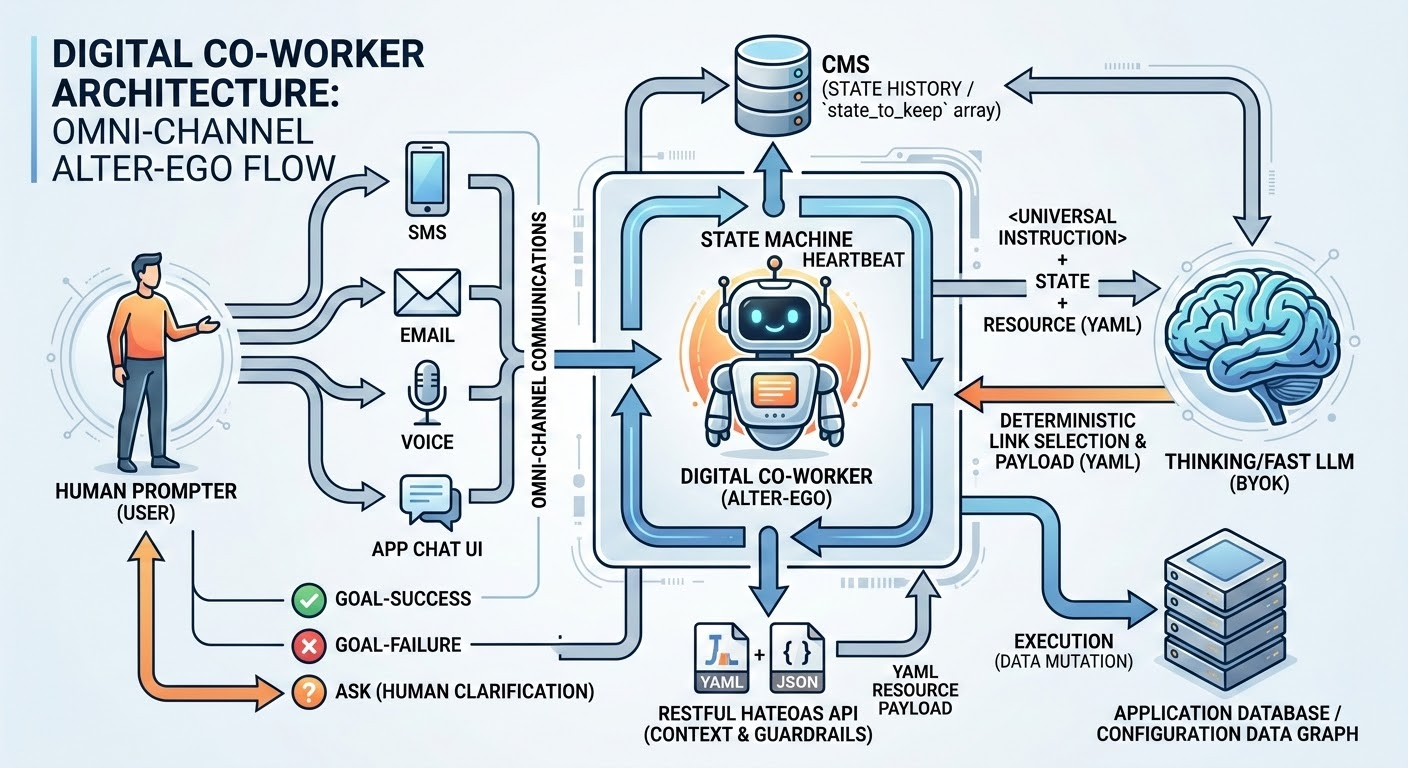
The "Invisible UI" Explained
While humans navigate applications using graphical screens with visual buttons, grids, and menus, your Digital Co-Worker navigates the app's "Invisible UI." This is a lightweight, machine-readable data graph dynamically generated by the platform. Instead of clicking HTML buttons, the AI selects from a strict, mathematically sound list of available links. Because this invisible UI is projected through your specific user identity, it is bound by the exact same row-level security and business rules as the visual screen. If a human isn't allowed to see a "Delete" button or access a specific client record, those options simply do not exist in the invisible UI.
Zero Extra Coding Required
The best part of this architecture is that the invisible UI requires absolutely zero additional coding. When you build your application using Code On Time, the platform automatically mirrors your visible UI into this rich REST Level 3 API at runtime. Every data controller, form field, and custom action you define for your human users is instantly translated into a hypermedia link for the AI. If you have built the app for a human, you have already built it for the Digital Co-Worker.
The Engineering Reality
If you cannot describe your AI integration strategy in one sentence, you don't have one. Here is ours:
"A heartbeat state machine with prompt batch-leasing that performs burst-iteration of loopback HTTP requests against a Level 3 HATEOAS API projected to user identity, secured by OAuth 2.0."
If that sounds like overkill, it is because we are not building a prototype. We are building an Enterprise Agent. Here is how the Axiom Engine delivers a Digital Co-Worker that transforms your business.
1. Loopback HTTP Requests (The Zero-Trust Firewall)
Most developers lazy-load their AI integration. They write a script that imports an internal library and calls OrderController.Create() directly. This bypasses the Firewall, Throttling middleware, IP restrictions, and the Auditing stack. It creates a "God Mode" backdoor into your database.
We reject this. The Axiom Engine built-into your database web application executes every single action via a Public Loopback HTTP Request.
- The Agent leaves the application boundary.
- It comes back via the public URL.
- It presents a valid Access Token.
- It passes through the full WAF (Web Application Firewall) and Security Pipeline.
If the request is valid for a human, it is valid for the Agent. If it isn't, it is blocked. Zero Trust is not a policy; it is physics.
2. Level 3 HATEOAS API (The Hallucination Firewall)
LLMs are probabilistic. They guess. If you give an AI a tool called delete_invoice, it will eventually try to use it on a paid invoice, simply because the probabilistic weight suggested it. You cannot fix this with "Prompt Engineering." You fix it with Architecture.
Our agents operate exclusively against a REST Level 3 Hypermedia API, the invisible UI.
- Level 2 API: Returns Data (
"status": "paid").
- Level 3 API: Returns Data + Controls (
_links).
When the Agent loads a paid invoice, the application logic runs and determines that a paid invoice cannot be deleted. Consequently, the API removes the
3. Multi-Modal Hypermedia (The Infinite Eye)
Standard agents choke on heavy data. If you ask a generic chatbot to "check the packaging on these 50 products," it crashes because passing 50 base64-encoded images blows up the context window and costs a fortune in tokens.
The Axiom Engine uses Hypermedia Lazy-Loading.
- The Link: When the Agent scans a record, it doesn't see a massive file; it sees a lightweight link:
rel: "picture".
- The Decision: The Agent decides if it needs to see the image.
- The Stream: If the Agent chooses to inspect it, the State Machine retrieves the BLOB via the link and passes it to the vision model instantly.
This allows your Co-Worker to index terabytes of documents, receipts, and photos without clogging the cognitive pipeline. It "sips" data from the firehose rather than drowning in it.
4. Prompt Batch-Leasing (The Scale Engine)
A chatbot is easy. A fleet of 1,000 autonomous agents working 24/7 is an engineering nightmare. If 500 agents wake up simultaneously to check inventory, they will DDoS your database.
Code On Time implements Batch-Leasing:
- The server's "Heartbeat" starts with the app going alive and is constantly looking for the incomplete prompt iterations.
- It "leases" a specific batch of active agents (e.g., 50 at a time).
- It loads their state, executes their next step, and saves them back to disk.
- It releases the lease and moves to the next batch.
This allows a standard web server to orchestrate a massive workforce of Digital Co-Workers without locking the database or exhausting thread pools.
5. State Machine Burst-Iteration (The Efficiency Model)
AI is slow. HTTP is fast. If your agent does one thing per wake-up cycle, a simple task like "Check stock, then create order" takes two minutes of "waking up" and "sleeping."
We use Burst-Iteration. When the State Machine wakes up an agent, it allows the agent to perform a rapid-fire sequence of HATEOAS transitions (Check Stock -> OK -> Check Credit -> OK -> Create Order) in a single "burst" of compute.
This mimics the human workflow: You don't log out after every mouse click. You perform a unit of work, then you rest.
6. Secured by OAuth 2.0 (The Sovereign Identity)
Who is doing the work? A generic "Service Account"?
In our architecture, the Application itself is the Identity Provider (IdP). Every Code On Time app ships with a native, built-in OAuth 2.0 implementation that supports the Authorization Code Flow (PKCE) for apps and the Device Authorization Flow for headless agents.
The State Machine includes the standard Access Token in the header of every loopback request (Authorization: Bearer …). The App validates this token against its own internal issuer, ensuring total self-sovereignty.
This enables Automated Token Management:
- The Loopback: The Agent presents the token. The App validates it against its own keys.
- The Offline Loop: With the
offline_access scope, the State Machine uses the Refresh Token to seamlessly mint new access tokens. This allows the Agent to work on long-running tasks without user intervention.
- The "Device Flow" Safety Net: If the refresh fails (e.g., the user is disabled), the Agent pauses and marks the session as "Unauthorized."
This triggers our Device Flow: the user receives an SMS or email: "Your Co-Worker needs permission to continue. Please visit /device and enter the code AKA-8LD."
7. The BYOK Model (No Middleman Tax)
Finally, how do you pay for intelligence?
Most AI platforms charge a markup on every token. We don't. The Digital Co-Worker operates on a Bring Your Own Key (BYOK) model. The LLM is yours—you simply provide the key, and the State Machine communicates directly with your corporate-approved AI provider.
You maintain total control via the app configuration:
- Granular Constraints: Define specific model flavors, duration limits, and token consumption caps.
- Role-Based Definitions: Create role-specific policies. Give your "Executives" a powerful "thinking" model (like o1) with higher consumption limits, while strictly controlling the AI budget for the rest of the workforce using a faster, cheaper model (like GPT-4o-mini).
It is trivial to enable the Digital Co-Worker. You simply assign the "Co-Worker" role to a user account. This instantly grants them access to the in-app prompt and the ability to text or email their Co-Worker (provided the Twilio/SendGrid webhooks are configured).
Every Code On Time application includes 100 free Digital Co-Workers (users with AI assistance). The Digital Co-Worker License enables the AI Co-Worker role for one additional user for one year, equipping them with an intelligent, autonomous assistant accessible via the app, email, or text that operates strictly within their security permissions. Purchase licenses only for the additional workers beyond the included 100.
8. Omnichannel Reach
Your workforce doesn't live in a Chat Window.
The Digital Co-Worker is not just a chatbot; it is a headless agent host that can be deployed anywhere.
- Text & Email: Configure hooks for Twilio or SendGrid to allow your workforce to query the Co-Worker via SMS or Email.
- Long-Term Memory: Unlike standard LLM sessions that are wiped when the browser closes, the Digital Co-Worker remembers context as long as needed, allowing it to manage long-running processes like supply chain orders or onboarding for months.
The "Virtual MCP Server" (Take It To-Go)
While the Digital Co-Worker is the fully autonomous agent living inside your server, we understand that you may be building your own MCP servers already.
That is why every Code On Time application includes a powerful, built-in feature: the Virtual MCP Server.
The Virtual MCP Server allows you to take a "slice" of the Co-Worker's power and export it to external LLM tools like Cursor, Claude Desktop, or your own Python scripts.
- How it works: It projects the HATEOAS API of a specific user account as a dynamic MCP Manifest.
- The Integration: You simply provide your LLM host with the App URL and an API Key.
- The Result: Your external LLM instantly gains "Tools" that match the user's permissions (e.g.,
list_customers, create_order).
Because the Virtual MCP Server uses the exact same HATEOAS "recipe" as the Digital Co-Worker, it is just as secure. You can use it to power your favorite IDE or chat prompt with secure, hallucination-free tools inferred directly from your live database web application.
Keep Your Brain, Upgrade Your Hands
We understand that you may have already invested heavily in AI. You have Sunk Costs: months spent refining system prompts and designing guardrails. But you also have Technical Debt in the form of brittle Python scripts and the "Bus Factor" risk of relying on a single developer.
Don't throw away your prompts. Just swap out the plumbing.
- Keep your existing MCP Servers running: You can register the Code On Time Virtual MCP Server alongside your existing custom tools. They coexist in the same manifest.
- Solve the "Bus Factor": You don't need to hire an expensive AI developer to replace brittle scripts. Your existing Database Administrator can build the replacement app using our App Studio. The code maintains itself.
- Build new prompts with the Virtual MCP: For the "Hard Stuff"—complex transactions like "Move my appointment"—switch to the Virtual MCP. You gain tools backed by the robust State Machine, enabling complex logic that was previously impossible.
How Do You Make Your AI Pilot Succeed?
Don't build an "AI Project." Build a Business App.
The industry is telling you to dump your data into a Vector Database and hire Prompt Engineers. They are wrong. They are trying to teach the AI to be a Database Administrator (writing SQL), when you should be teaching it to be a User (clicking buttons).
To make your AI pilot succeed, you need to give it a User Interface.
When you build a database web app with Code On Time, you are building two interfaces simultaneously:
- The Touch UI: For your human employees to do their work. It is optional and can be reduced to a single prompt.
- The Axiom API: A standard, HATEOAS-driven interface for your Digital Co-Worker.
You don't need to define "Tools" for the AI. You don't need to write "System Prompts" to enforce security. You simply build the app.
- If you add a "Manager Approval" rule to the screen, the AI instantly respects it.
- If you hide the "Salary" column from the grid, the AI instantly loses access to it.
Your AI Pilot succeeds not because it is smarter, but because it is grounded. It lives inside the application, subject to the same laws of physics as every other employee.
You can spend millions building a "Smart Driver" (a custom LLM) that tries to navigate your messy dirt roads. Or, you can build a "Smart Highway" (The Axiom Engine) that lets any standard model drive safely at 100 MPH. Code On Time provides the highway.