Business Rules

Unlock the power of the Builder Edition, enable AI Scaffolding, and debug with Visual Studio by mastering this database-agnostic utility.

Labels
AI(14) AJAX(112) App Studio(10) Apple(1) Application Builder(245) Application Factory(207) ASP.NET(95) ASP.NET 3.5(45) ASP.NET Code Generator(72) ASP.NET Membership(28) Azure(18) Barcode(2) Barcodes(3) BLOB(18) Business Rules(3) Business Rules/Logic(140) BYOD(13) Caching(2) Calendar(5) Charts(29) Cloud(14) Cloud On Time(2) Cloud On Time for Windows 7(2) Code Generator(54) Collaboration(11) command line(1) Conflict Detection(1) Content Management System(12) COT Tools for Excel(26) CRUD(1) Custom Actions(1) Data Aquarium Framework(122) Data Sheet(9) Data Sources(22) Database Lookups(50) Deployment(22) Designer(178) Device(1) Digital Workforce(3) DotNetNuke(12) EASE(20) Email(6) Features(101) Firebird(1) Form Builder(14) Globalization and Localization(6) HATEOAS(5) How To(1) Hypermedia(3) Inline Editing(1) Installation(5) JavaScript(20) Kiosk(1) Low Code(3) Mac(1) Many-To-Many(4) Maps(6) Master/Detail(36) Micro Ontology(5) Microservices(4) Mobile(63) Mode Builder(3) Model Builder(3) MySQL(10) Native Apps(5) News(18) OAuth(9) OAuth Scopes(1) OAuth2(13) Offline(20) Offline Apps(4) Offline Sync(5) Oracle(11) PKCE(2) Postgre SQL(1) PostgreSQL(2) PWA(2) QR codes(2) Rapid Application Development(5) Reading Pane(2) Release Notes(185) Reports(48) REST(29) RESTful(31) RESTful Workshop(15) RFID tags(1) SaaS(7) Security(81) SharePoint(12) SPA(6) SQL Anywhere(3) SQL Server(26) SSO(1) Stored Procedure(4) Teamwork(15) Tips and Tricks(87) Tools for Excel(3) Touch UI(93) Transactions(5) Tutorials(183) Universal Windows Platform(3) User Interface(338) Video Tutorial(37) Web 2.0(100) Web App Generator(101) Web Application Generator(607) Web Form Builder(40) Web.Config(9) Workflow(28)
Archive
Blog
Business Rules
Tuesday, November 25, 2025PrintSubscribe
Expanding Your Toolkit: The Strategic Value of SqlText

The SQL Business Rule has long been the superpower of the Code On Time developer. It allows you to inject validation, logging, and custom data processing directly into your application using the language you know best—SQL. For high-performance, database-specific tasks, it remains the gold standard.

But as the Code On Time platform evolves with the Digital Workforce, Builder Edition, and AI Scaffolding, there are specific scenarios where you might need a different kind of tool.

This is where the [ProjectNamespace].Data.SqlText utility class shines.

It isn't about replacing the SQL rules you love; it's about extending your reach to platforms and technologies where raw T-SQL or PL/SQL cannot go.

1. The Key to the Builder Edition (SQLite)

The Builder Edition allows you to build unlimited commercial applications for free and accelerated by the Digital Workforce. To make this portable and lightweight, it defaults to using SQLite.

While SQLite is a powerful database engine, it does not support the rich procedural languages (like T-SQL or PL/SQL) that drive standard SQL Business Rules.

  • The Challenge: How do you write server-side validation logic (e.g., "Check if Customer exists") in an app running on SQLite?
  • The Solution: Type: Code business rules using the SqlText class. This allows you to write standard SQL queries wrapped in C# or VB.NET, which the framework automatically translates for SQLite. It is the only way to build complex server-side logic for Builder Edition apps.

2. A Blueprint for AI Scaffolding (GEN)

We are introducing GEN (Scaffolding) capabilities that allow you to "export" your application logic to completely different technology stacks, such as Next.js, Python, or standard ASP.NET Core APIs.

  • The Challenge: An AI agent cannot easily translate a block of raw T-SQL into a Node.js API route because the logic is "locked" inside the database dialect.
  • The Solution: Logic written with SqlText acts as a "White Box" for the Axiom Engine. The AI can read your C# code, understand the intent, and natively re-implement it in the target language. If you plan to use your app as a specification for a custom build, SqlText ensures your business rules travel with you.

3. Debugging with "Pro Code" Tools

For complex logic, nothing beats a real debugger.

  • The Advantage: Unlike SQL scripts, Type: Code rules live in your project's source files. You can use the "Edit Code" action to open your rule in Visual Studio, set breakpoints, and step through your logic while the app runs. It combines the speed of the App Studio with the precision of a professional IDE.

Learn the Pattern

We have released a comprehensive tutorial to help you add this tool to your belt. Whether you are building a portable app for the Builder Edition or preparing a specification for the Digital Workforce, this guide shows you how to write secure, database-agnostic logic.

Read the Tutorial: Using the SqlText Class in "Code" Business Rules
Master the tools that let you build anywhere, for any platform.
Labels: Business Rules
Thursday, June 19, 2025PrintSubscribe
Beyond CRUD: Tailoring Your App with Custom Actions

Automatically generated apps are a fantastic starting point. With a few clicks, you have a powerful, professional-looking application with robust capabilities for creating, reading, updating, and deleting records (CRUD). But real-world business requirements are rarely that simple.

What happens when your users need to do more than just edit a product? What if they need to trigger a specific business process, like marking a product as discontinued, changing its supplier based on complex rules, or applying a batch update to dozens of records at once? This is where a standard CRUD interface reaches its limit, and the true power of your application platform needs to shine.

From Simple Clicks to Smart Operations

In Code On Time, the answer lies in a powerful, decoupled system of Actions and Business Rules. Think of it this way:

  • An Action is the user-facing component—a button in a form or an option in a context menu that a user can click. You define what it looks like, where it appears, and what it's called.
  • A Business Rule is the server-side logic that executes when the Action is triggered. This is where you define what actually happens.

This separation is key. You can have multiple actions in different parts of the UI trigger the same underlying business rule, ensuring consistency and reducing code duplication.

For example, a "Mark as Discontinued" option can be added to a row's context menu with just a few property settings.
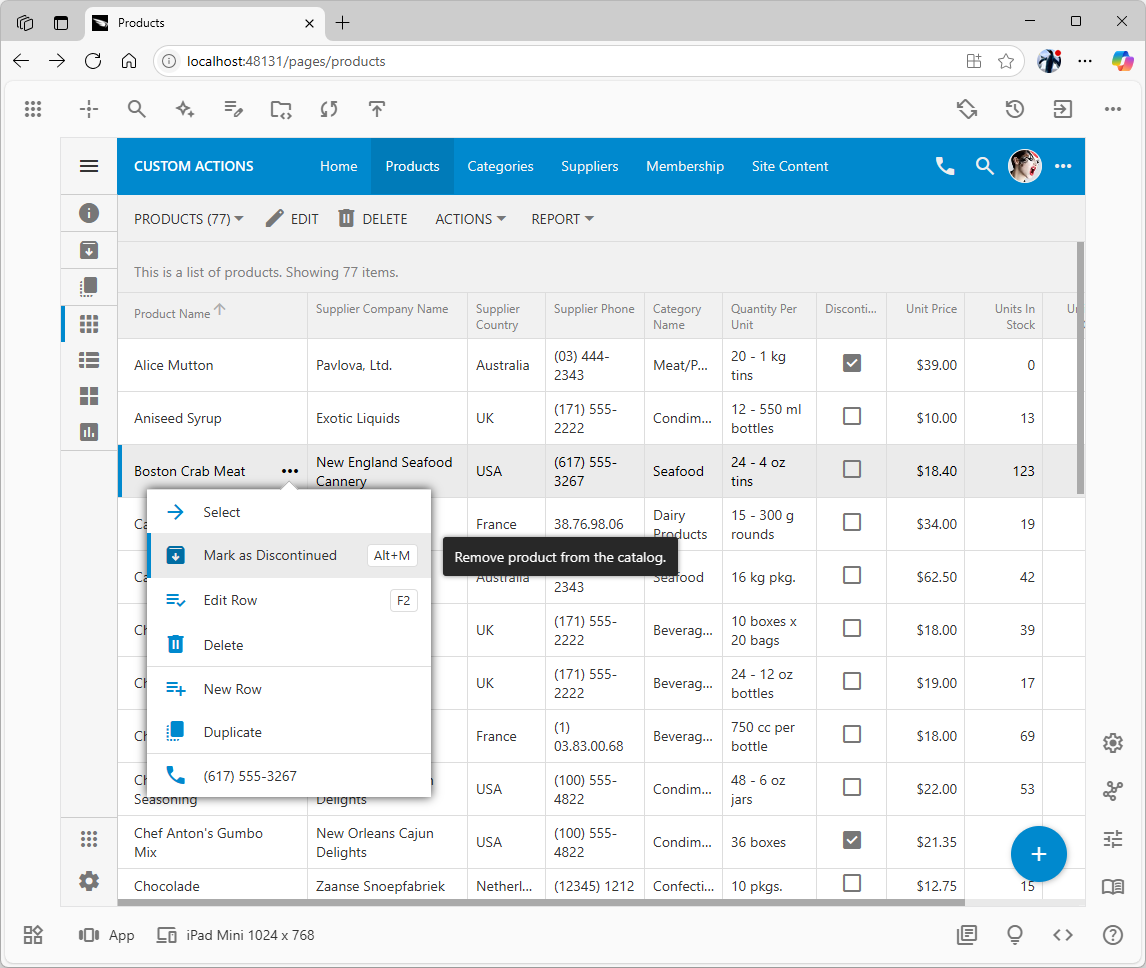
image3.png

Clicking the 'More' icon next to the first column displays the row's context menu, which is populated with actions defined in the 'Grid' scope group. The tooltip that appears on hover, "Remove product from the catalog," is pulled directly from the action's Description property, demonstrating how configuration directly maps to the user experience.

And you can easily add a confirmation dialog to prevent accidental clicks, providing a crucial safeguard for important operations.
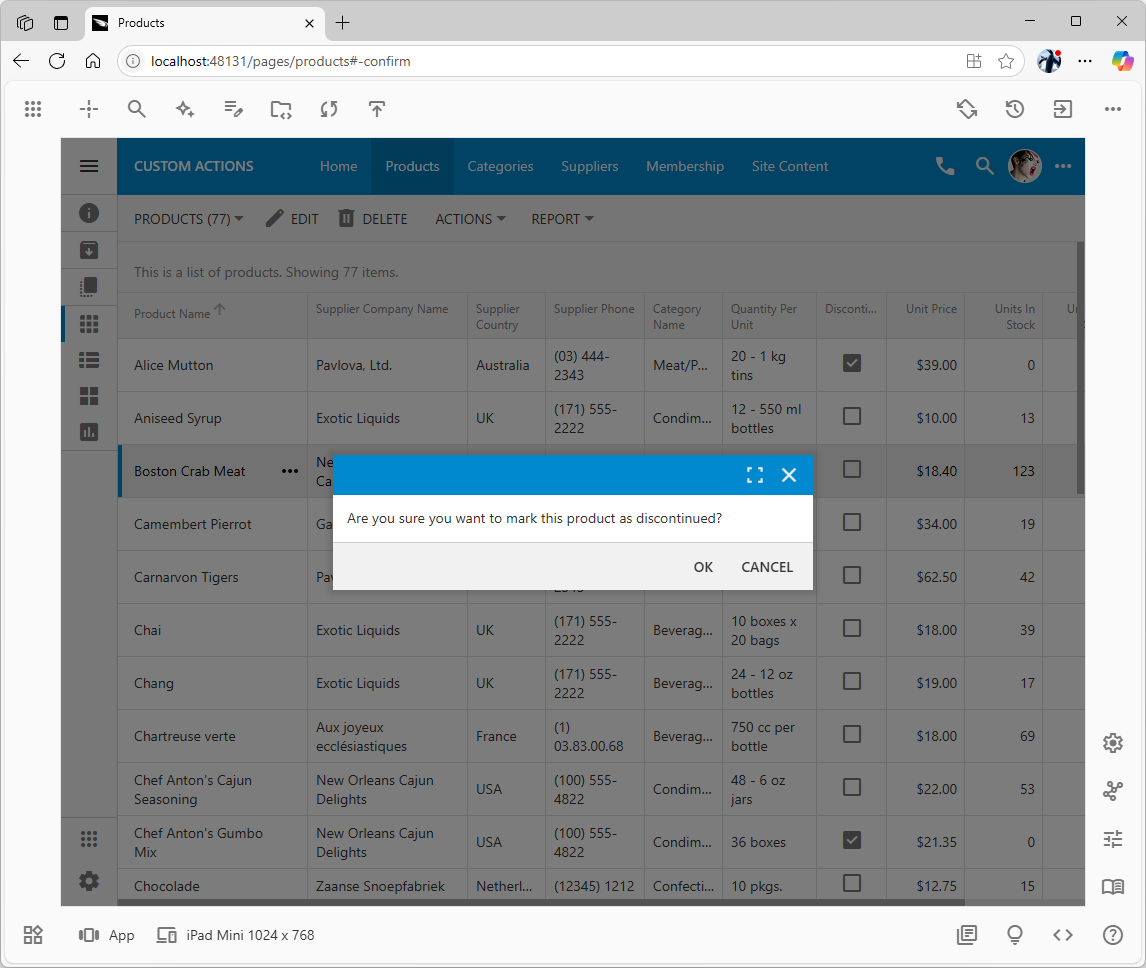
image1.png

A simple modal confirmation dialog appears when the action is invoked, serving as a crucial safeguard against accidental operations. This dialog, generated from the action's Confirmation / Text property, is intuitive for the end-user, who can dismiss it with the 'Esc' key or confirm it with the 'Enter' key.

Collecting User Input for Complex Tasks

Some business processes require more information. Replacing a product's supplier isn't a simple "yes/no" decision. You need to know which new supplier to choose.

This is where you can leverage a "Confirmation Controller"—a dedicated form designed to collect additional parameters from the user before an action is executed. This technique allows you to create complex, multi-step operations that feel seamless to the end-user.
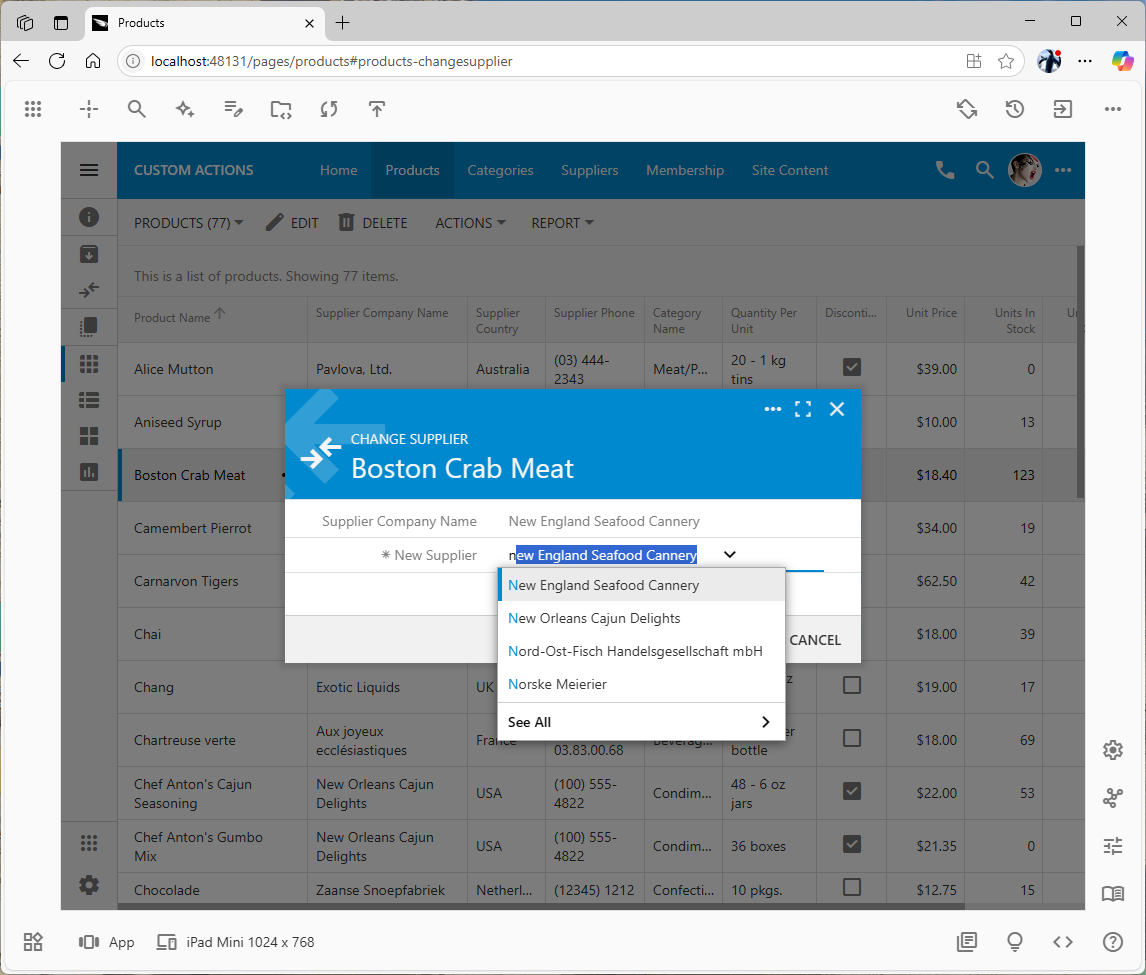
image2.png

The view1 form of the Products_ChangeSupplier is shown when the user is selecting a new supplier for the product. The form is displayed when app users initiate the changesSupplier action in the `Products controller. This modal form acts as a temporary data collection tool. This powerful technique allows for the creation of complex, multi-step operations that require additional user input without cluttering the primary interface.

Bringing Intelligence to the Front-End, with SQL

The most innovative part of this system is how you can control the entire client-server interaction without leaving the comfort of a familiar language like T-SQL. The business rules you write on the server can intelligently direct the user interface on the client.

Imagine the "Change Supplier" action requires that the new supplier must already provide other products in the same category. You can write a simple SQL business rule to validate this logic. If the user selects an invalid supplier, the rule can instruct the front-end to:

  1. Stop the action from proceeding.
  2. Set the focus directly on the invalid input field.
  3. Display a precise error message right where the user needs to see it.
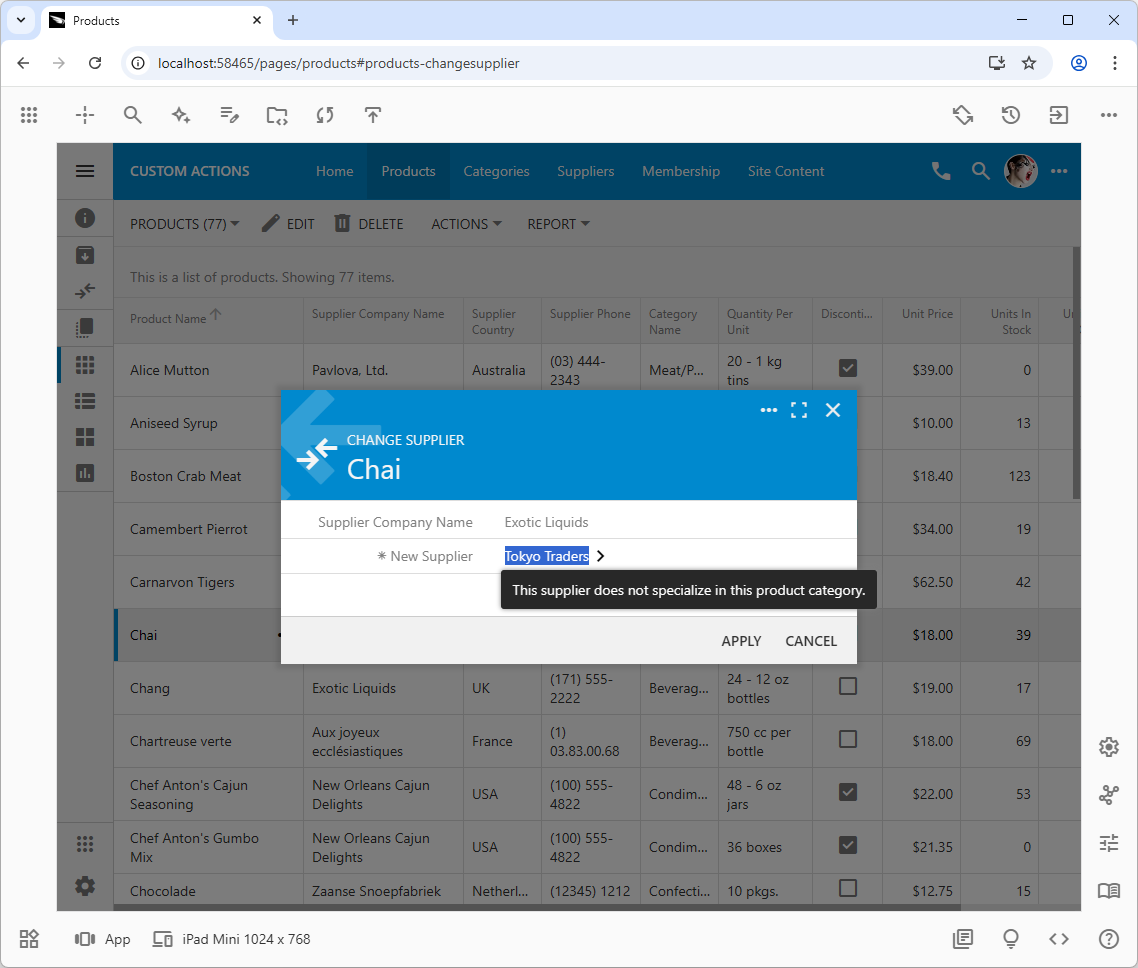
image4.png

This targeted error message showcases intelligent server-client communication. Instead of returning a generic error, the server-side business rule uses the @Result_Focus parameter to instruct the client-side UI to focus on the specific field that failed validation and display a helpful message directly next to it. Use a comma to separate the field name from the message. The front end will automatically activate the tabbed category or category associated with another wizard step if the field input is not visible at the moment.

This entire sophisticated, client-side interaction is commanded by your server-side SQL script. You don't write a single line of JavaScript to make it happen. The framework handles the complex plumbing, allowing you to focus purely on the business logic.

Ready to Build Your Own?

From simple confirmations to multi-step, validated batch operations, Custom Actions provide the flexibility to mold your application to fit any business need. This high-level overview just scratches the surface of what's possible.

To learn how to implement these features step-by-step, from creating your first action to programming conditional validation logic, dive into our comprehensive tutorial.
Read the Full Tutorial: Custom Actions
Labels: Business Rules
Saturday, March 19, 2022PrintSubscribe
Lesson: Custom Actions With Hypermedia

The REST API Level 2 and above must support HTTP methods (verbs) in resource handling. For example, the request with the GET method is expected to return the resource data while the request with the PATCH method is expected to modify some of its fields. The number of HTTP verbs is limited and will not cover all possible scenarios of data manipulation.

Enhance the RESTful API of applications with custom actions to go beyond CRUD.
Confirmation controller "SellPrompt" presents the user with an option to sell 1, 5, or 10 units of a product with a single touch. The "Other" option allows entering the arbitrary quantity of units to sell. The prompt is displayed when users press the "Sell" button in the product form.
RESTful API Engine makes the custom action "sell" available to the client apps.  The parameters of the action are specified in the "parameters" key of the payload. The new state of the resource is returned in the response.
RESTful API Engine makes the custom action "sell" available to the client apps. The parameters of the action are specified in the "parameters" key of the payload. The new state of the resource is returned in the response.