App Studio is the core of the Code On Time platform. It allows developers to build sophisticated, secure, and scalable database applications at lightning speed. But unlike traditional RAD tools that only build screens for humans, App Studio builds Dual-Interface Applications: a rich UI for your users and an invisible API for your Digital Workforce.
1. Visual Development (App Mode)
Forget the "Alt-Tab" tax. With App Studio, you build your application inside your application.
- Live Inspection: Click on any grid, field, or button in your running app to instantly locate its configuration.
- Instant Feedback: Change labels, drag-and-drop fields, and configure logic with zero compile time.
- AI Assistance: Use the built-in Tutor, Builder, and Scribe to automate complex tasks using natural language.
2. Digital Co-Worker (AI-Ready)
Don't just build for humans. Build for the Digital Workforce.
Every application created with App Studio includes a built-in Digital Co-Worker. Your app doesn't just serve user interfaces; it transforms into a secure "Agent Host" that can reason, act, and transact on behalf of your users.
- Powered by Micro-Ontology: The built-in Axiom Engine ensures that AI agents (and human users) are bound by the same strict business logic, security roles, and state transitions.
- Omnichannel Reach: Enable your users to interact with your app via SMS, Email, or Voice—managing complex workflows without ever opening a browser.
- Virtual MCP Server: Your app automatically projects a standard Model Context Protocol endpoint, allowing you to connect Claude, ChatGPT, or Cursor to your live data in seconds.
3. Field Worker (Offline Sync)
Turn any application into a powerful tool for your field workforce.
- Zero Connectivity: Empower users to work in the most isolated places on Earth. The app automatically downloads data and logic to the device.
- Transactional Integrity: Users can capture complex data, scan barcodes, and complete inspections offline. The app synchronizes securely when a connection is restored.
- Native Performance: Runs as a Progressive Web App (PWA) or native shell on iOS, Android, Windows, and macOS.
4. Enterprise Security & SSO
Security is not an afterthought; it is the foundation.
5. Hardware Integration
Bridge the digital and physical worlds.
- Barcode Reader: Use the device camera to scan 1D and 2D barcodes directly into fields. Trigger custom automation rules instantly upon scan.
- Location Services: Capture GPS coordinates and geofencing data for field audits and inspections.
6. The "Invisible" Backend
Every App Studio application is a powerful backend server.
- HATEOAS API: Automatically generates a Level 3 RESTful API that mirrors your UI.
- Microservices Ready: Use your app as a standalone microservice or part of a larger federated mesh.

This is the"Switch Application View”.menu. The App Studio remembers your selection and will activate your preferred mode of application development. If the app is broken,then the “Workspace” mode is the only way to revive it.
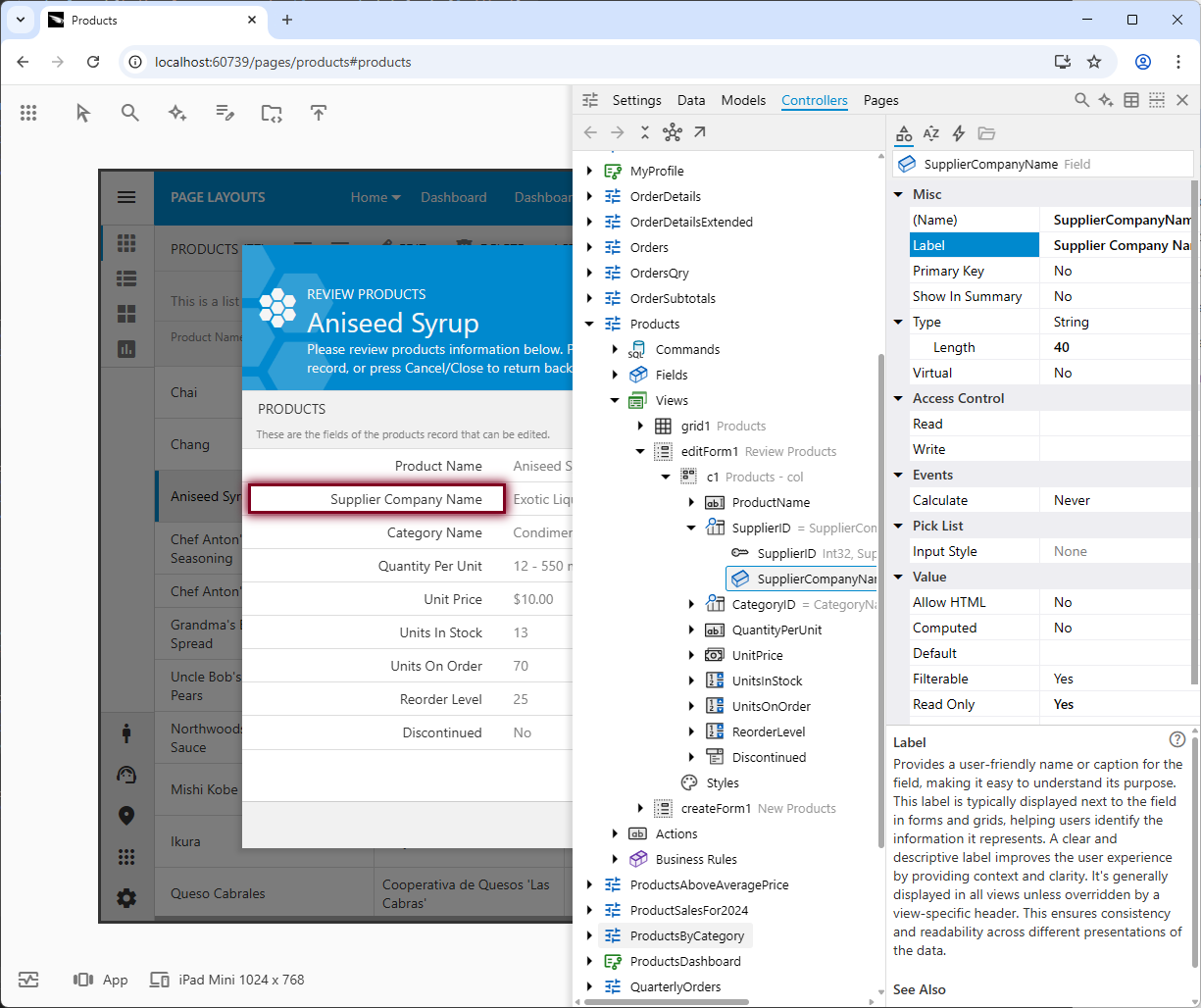
The screenshot displays the App Explorer following a live inspection of the "Supplier Company Name" column header. The image shows the attached hierarchy and properties side-by-side, with the "Label" property of the "ProductName" field selected. A brief description explains the property's purpose. Tabs within the title grant quick access to "Settings", “Data”, "Models", "Controllers", and "Pages". The right side of the title contains buttons for "Search", “Ask Builder”, "Display Hierarchy as Table", "Split Vertically", and "Close".