Instead of allowing the application framework to handle the CRUD operations, let’s prevent the default behavior and implement several business rules. These business rules with use the ASP.NET Membership API to insert, update, and delete users.
Insert
In the Project Explorer, right-click on Users / Business Rules node, and press New Business Rule.
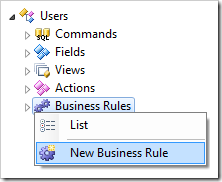
Assign the following properties:
| Property | Value |
| Type | C# / Visual Basic |
| Command Name | Insert |
| Phase | Before |
Press OK to save the business rule. On the toolbar, press Browse to regenerate the web app and create the business rule file. When finished, right-click on Users / Business Rules / Insert (Code / Before) – r101 node and press Edit Rule in Visual Studio.
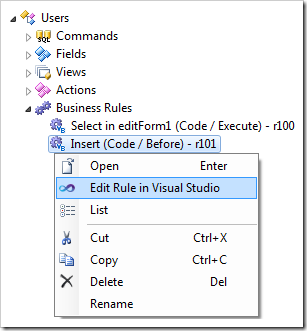
Replace the content of the file with the following:
C#:
using System;
using System.Web;
using System.Web.Security;
using MyCompany.Data;
using MyCompany.Security;

namespace MyCompany.Rules
{
    public partial class UsersBusinessRules : MyCompany.Data.BusinessRules
    {

        /// <summary>
        /// This method will execute in any view before an action
        /// with a command name that matches "Insert".
        /// </summary>
        [Rule("r101")]
        public void r101Implementation(
                    FieldValue userID,
                    string userName,
                    string password,
                    string email,
                    string comment,
                    string passwordQuestion,
                    string passwordAnswer,
                    bool isApproved,
                    DateTime? lastActivityDate,
                    DateTime? lastLoginDate,
                    DateTime? lastPasswordChangedDate,
                    DateTime? creationDate,
                    bool? isLockedOut,
                    DateTime? lastLockedOutDate,
                    int? failedPasswordAttemptCount,
                    DateTime? failedPasswordAttemptWindowStart,
                    int? failedPasswordAnswerAttemptCount,
                    DateTime? failedPasswordAnswerAttemptWindowStart,
                    string roles,
                    string confirmPassword,
                    int? roleID)
        {
            // prevent execution of CRUD operations by the application framework
            PreventDefault();
            // ensure that "Password" and "ConfirmPassword" match
            if (password != confirmPassword)
                throw new Exception(Localize("PasswordAndConfirmationDoNotMatch",
                    "Password and confirmation do not match"));
            // create a user with the Membership API
            MembershipCreateStatus status;
            MembershipUser newUser = Membership.CreateUser(userName, password, email,
                passwordQuestion, passwordAnswer, isApproved, out status);
            // analyze and report any errors
            if (status != MembershipCreateStatus.Success)
            {
                string error = null;
                switch (status)
                {
                    case MembershipCreateStatus.DuplicateEmail:
                        error = "Duplicate email address.";
                        break;
                    case MembershipCreateStatus.DuplicateProviderUserKey:
                        error = "Duplicate provider key";
                        break;
                    case MembershipCreateStatus.DuplicateUserName:
                        error = "Duplicate user name.";
                        break;
                    case MembershipCreateStatus.InvalidAnswer:
                        error = "Invalid password recovery answer.";
                        break;
                    case MembershipCreateStatus.InvalidEmail:
                        error = "Invalid email address.";
                        break;
                    case MembershipCreateStatus.InvalidPassword:
                        error = string.Format("Invalid password. Requires at least {0} " +
                            "characters and {1} non-alphanumeric characters.",
                            Membership.Provider.MinRequiredPasswordLength,
                            Membership.Provider.MinRequiredNonAlphanumericCharacters);
                        break;
                    case MembershipCreateStatus.InvalidProviderUserKey:
                        error = "Invalid provider user key.";
                        break;
                    case MembershipCreateStatus.InvalidQuestion:
                        error = "Invalid password recovery question.";
                        break;
                    case MembershipCreateStatus.InvalidUserName:
                        error = "Invalid user name.";
                        break;
                    case MembershipCreateStatus.ProviderError:
                        error = "Provider error.";
                        break;
                    case MembershipCreateStatus.UserRejected:
                        error = "User has been rejected.";
                        break;
                }
                throw new Exception(error);
            }
            // assign "Comment" to the new user
            if (!(String.IsNullOrEmpty(comment)))
            {
                newUser.Comment = comment;
                Membership.UpdateUser(newUser);
            }
            // assign "Roles" to the new user
            if (!(String.IsNullOrEmpty(roles)))
            {
                string[] newRoles = Convert.ToString(roles).Split(',');
                foreach (string role in newRoles)
                    if (!(String.IsNullOrEmpty(role)))
                        System.Web.Security.Roles.AddUserToRole(
                            userName, role);
            }
        }
    }
}
Visual Basic:
Imports MyCompany.Data
Imports System
Imports System.Collections.Generic
Imports System.Data
Imports System.Linq
Imports System.Text.RegularExpressions
Imports System.Web
Imports System.Web.Security

Namespace MyCompany.Rules

    Partial Public Class UsersBusinessRules
        Inherits MyCompany.Data.BusinessRules

        ''' <summary>
        ''' This method will execute in any view before an action
        ''' with a command name that matches "Insert".
        ''' </summary>
        <Rule("r101")> _
        Public Sub r101Implementation( _
                    ByVal userID As FieldValue, _
                    ByVal userName As String, _
                    ByVal password As String, _
                    ByVal email As String, _
                    ByVal comment As String, _
                    ByVal passwordQuestion As String, _
                    ByVal passwordAnswer As String, _
                    ByVal isApproved As Nullable(Of Boolean),
                    ByVal isLockedOut As Nullable(Of Boolean), _
                    ByVal roles As String, _
                    ByVal confirmPassword As String)
            ' prevent execution of CRUD operations by the application framework
            PreventDefault()
            ' ensure that "Password" and "ConfirmPassword" match
            If (password <> confirmPassword) Then
                Throw New Exception(Localize("PasswordAndConfirmationDoNotMatch",
                                             "Password and confirmation do not match"))
            End If
            Dim status As MembershipCreateStatus
            ' create a user with the Membership API
            Dim newUser As MembershipUser = Membership.CreateUser(userName,
                                  password,
                                  email,
                                  passwordQuestion,
                                  passwordAnswer,
                                  isApproved,
                                  status)
            ' analyze and report any errors
            If (status <> MembershipCreateStatus.Success) Then
                Dim [error] As String = ""
                Select Case status
                    Case MembershipCreateStatus.DuplicateEmail
                        [error] = "Duplicate email address."
                    Case MembershipCreateStatus.DuplicateProviderUserKey
                        [error] = "Duplicate provider key"
                    Case MembershipCreateStatus.DuplicateUserName
                        [error] = "Duplicate user name."
                    Case MembershipCreateStatus.InvalidAnswer
                        [error] = "Invalid password recovery answer."
                    Case MembershipCreateStatus.InvalidEmail
                        [error] = "Invalid email address."
                    Case MembershipCreateStatus.InvalidPassword
                        [error] = String.Format("Invalid password. Requires at least {0} " +
                            "characters and {1} non-alphanumeric characters.",
                            Membership.Provider.MinRequiredPasswordLength,
                            Membership.Provider.MinRequiredNonAlphanumericCharacters)
                    Case MembershipCreateStatus.InvalidProviderUserKey
                        [error] = "Invalid provider user key."
                    Case MembershipCreateStatus.InvalidQuestion
                        [error] = "Invalid password recovery question."
                    Case MembershipCreateStatus.InvalidUserName
                        [error] = "Invalid user name."
                    Case MembershipCreateStatus.ProviderError
                        [error] = "Provider error."
                    Case MembershipCreateStatus.UserRejected
                        [error] = "User has been rejected."
                End Select
                Throw New Exception([error])
            End If
            ' assign "Comment" to the new user
            If (Not (String.IsNullOrEmpty(comment))) Then
                newUser.Comment = comment
                Membership.UpdateUser(newUser)
            End If
            ' assign "Roles" to the new user
            If (Not String.IsNullOrEmpty(roles)) Then
                Dim newRoles() As String = Convert.ToString(roles).Split(",")
                For Each role As String In newRoles
                    If (Not String.IsNullOrEmpty(role)) Then
                        System.Web.Security.Roles.AddUserToRole(userName, role)
                    End If
                Next

            End If
        End Sub
    End Class
End Namespace
Save the file.
Update
Create another business rule with the following properties:
| Property |
Value |
| Type |
C# / Visual Basic |
| Command Name |
Update |
| Phase |
Before |
Save the business rule, and generate the web app. Edit the rule in Visual Studio. You may need to press Refresh in the Solution Explorer toolbar of Visual Studio for the rule to appear.
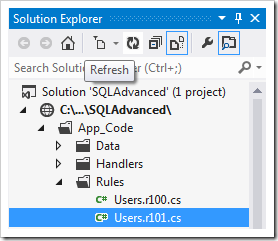
Replace the code base with the following.
C#:
using System;
using System.Web.Security;
using MyCompany.Data;
using MyCompany.Security;

namespace MyCompany.Rules
{
    public partial class UsersBusinessRules : MyCompany.Data.BusinessRules
    {

        /// <summary>
        /// This method will execute in any view before an action
        /// with a command name that matches "Update".
        /// </summary>
        [Rule("r102")]
        public void r102Implementation(
                    FieldValue userID,
                    string userName,
                    FieldValue password,
                    FieldValue email,
                    FieldValue comment,
                    FieldValue passwordQuestion,
                    FieldValue passwordAnswer,
                    FieldValue isApproved,
                    DateTime? lastActivityDate,
                    DateTime? lastLoginDate,
                    DateTime? lastPasswordChangedDate,
                    DateTime? creationDate,
                    FieldValue isLockedOut,
                    DateTime? lastLockedOutDate,
                    int? failedPasswordAttemptCount,
                    DateTime? failedPasswordAttemptWindowStart,
                    int? failedPasswordAnswerAttemptCount,
                    DateTime? failedPasswordAnswerAttemptWindowStart,
                    FieldValue roles)
        {
            // prevent execution of CRUD operations by the application framework
            PreventDefault();
            // get user object by name
            MembershipUser user = Membership.GetUser(userName);
            if (user != null)
            {
                // update "Email" if changed
                if (email.Modified)
                {
                    user.Email = Convert.ToString(email.Value);
                    Membership.UpdateUser(user);
                }
                // update "Is Approved" if changed
                if (isApproved.Modified)
                {
                    user.IsApproved = Convert.ToBoolean(isApproved.Value);
                    Membership.UpdateUser(user);
                }
                // unlock user account if necessary
                if (isLockedOut.Modified)
                {
                    if (Convert.ToBoolean(isLockedOut.Value))
                    {
                        Result.Focus("IsLockedOut", Localize("UserCannotBeLockedOut",
                            "User cannot be locked out. If you want to prevent this " +
                            "user from being able to login then simply mark user as" +
                            " \'Not Approved\'."));
                        throw new Exception(Localize("ErrorSavingUser",
                            "Error saving user account."));
                    }
                    user.UnlockUser();
                }
                // update "Comment" if changed
                if (comment.Modified)
                {
                    user.Comment = Convert.ToString(comment.Value);
                    Membership.UpdateUser(user);
                }
                // update "Roles" if changed
                if (roles.Modified)
                {
                    string[] newRoles = Convert.ToString(roles.Value).Split(',');
                    string[] oldRoles = System.Web.Security.Roles.GetRolesForUser(
                        user.UserName);
                    foreach (string role in oldRoles)
                        if (!(String.IsNullOrEmpty(role)) && (Array.IndexOf(
                            newRoles, role) == -1))
                            System.Web.Security.Roles.RemoveUserFromRole(
                                user.UserName, role);
                    foreach (string role in newRoles)
                        if (!(String.IsNullOrEmpty(role)) &&
                            (Array.IndexOf(oldRoles, role) == -1))
                            System.Web.Security.Roles.AddUserToRole(
                                user.UserName, role);
                }
            }
        }
    }
}
Visual Basic:
Imports MyCompany.Data
Imports System
Imports System.Web.Security

Namespace MyCompany.Rules

    Partial Public Class UsersBusinessRules
        Inherits MyCompany.Data.BusinessRules

        ''' <summary>
        ''' This method will execute in any view before an action
        ''' with a command name that matches "Update".
        ''' </summary>
        <Rule("r102")> _
        Public Sub r102Implementation( _
                    ByVal userID As FieldValue, _
                    ByVal userName As String, _
                    ByVal password As FieldValue, _
                    ByVal email As FieldValue, _
                    ByVal comment As FieldValue, _
                    ByVal passwordQuestion As FieldValue, _
                    ByVal passwordAnswer As FieldValue, _
                    ByVal isApproved As FieldValue, _
                    ByVal lastActivityDate As Nullable(Of DateTime), _
                    ByVal lastLoginDate As Nullable(Of DateTime), _
                    ByVal lastPasswordChangedDate As Nullable(Of DateTime), _
                    ByVal creationDate As Nullable(Of DateTime), _
                    ByVal isLockedOut As FieldValue, _
                    ByVal lastLockedOutDate As Nullable(Of DateTime), _
                    ByVal failedPasswordAttemptCount As Nullable(Of Integer), _
                    ByVal failedPasswordAttemptWindowStart As Nullable(Of DateTime), _
                    ByVal failedPasswordAnswerAttemptCount As Nullable(Of Integer), _
                    ByVal failedPasswordAnswerAttemptWindowStart As Nullable(Of DateTime), _
                    ByVal roles As FieldValue, _
                    ByVal confirmPassword As String, _
                    ByVal roleID As Nullable(Of Integer))
            ' prevent execution of CRUD operations by the application framework
            PreventDefault()
            ' get user object by name
            Dim user As MembershipUser = Membership.GetUser(userName)
            If Not (user Is Nothing) Then
                ' update "Email" if changed
                If email.Modified Then
                    user.Email = Convert.ToString(email.Value)
                    Membership.UpdateUser(user)
                End If
                ' update "Is Approved" if changed
                If isApproved.Modified Then
                    user.IsApproved = Convert.ToBoolean(isApproved.Value)
                    Membership.UpdateUser(user)
                End If
                ' unlock user account if necessary
                If isLockedOut.Modified Then
                    If (Convert.ToBoolean(isLockedOut.Value)) Then
                        Result.Focus("IsLockedOut", Localize("UserCannotBeLockedOut",
                            "User cannot be locked out. If you want to prevent this " +
                            "user from being able to login then simply mark user as " +
                            "'Not Approved'."))
                        Throw New Exception(Localize("ErrorSavingUser",
                                "Error saving user account."))
                    End If
                    user.UnlockUser()
                End If
                ' update "Comment" if changed
                If comment.Modified Then
                    user.Comment = Convert.ToString(comment.Value)
                    Membership.UpdateUser(user)
                End If
                ' update "Roles" if changed
                If roles.Modified Then
                    Dim newRoles() As String = Convert.ToString(roles.Value).Split(",")
                    Dim oldRoles() As String = System.Web.Security.Roles.GetRolesForUser(
                        user.UserName)
                    For Each role As String In oldRoles
                        If Not (String.IsNullOrEmpty(role) And (Array.IndexOf(
                                                                newRoles, role) = -1)) Then
                            System.Web.Security.Roles.RemoveUserFromRole(user.UserName, role)
                        End If
                    Next
                    For Each role As String In newRoles
                        If Not (String.IsNullOrEmpty(role) And (Array.IndexOf(
                                                                oldRoles, role) = -1)) Then
                            System.Web.Security.Roles.AddUserToRole(user.UserName, role)
                        End If
                    Next
                End If
            End If
        End Sub
    End Class
End Namespace
Save the file.
Delete
Create another business rule:
| Property |
Value |
| Type |
C# / Visual Basic |
| Command Name |
Delete |
| Phase |
Before |
Save, regenerate the web app, and open the business rule file in Visual Studio. Replace the code:
C#:
using System;
using System.Data;
using System.Collections.Generic;
using System.Linq;
using System.Text.RegularExpressions;
using System.Web;
using System.Web.Security;
using MyCompany.Data;
using MyCompany.Security;

namespace MyCompany.Rules
{
    public partial class UsersBusinessRules : MyCompany.Data.BusinessRules
    {

        /// <summary>
        /// This method will execute in any view before an action
        /// with a command name that matches "Delete".
        /// </summary>
        [Rule("r103")]
        public void r103Implementation(
                    FieldValue userID,
                    string userName,
                    string password,
                    string email,
                    string comment,
                    string passwordQuestion,
                    string passwordAnswer,
                    bool? isApproved,
                    DateTime? lastActivityDate,
                    DateTime? lastLoginDate,
                    DateTime? lastPasswordChangedDate,
                    DateTime? creationDate,
                    bool? isLockedOut,
                    DateTime? lastLockedOutDate,
                    int? failedPasswordAttemptCount,
                    DateTime? failedPasswordAttemptWindowStart,
                    int? failedPasswordAnswerAttemptCount,
                    DateTime? failedPasswordAnswerAttemptWindowStart)
        {
            // prevent execution of CRUD operations by the application framework
            PreventDefault();
            // delete the user account
            MembershipUser user = Membership.GetUser(userName);
            Membership.DeleteUser(user.UserName);
            // instruct the client library to display the previous view
            Result.ShowLastView();
            // instruct the client library to show a confirmation message
            Result.ShowMessage(String.Format(Localize("UserHasBeenDeleted",
                "User \'{0}\' has been deleted."), user.UserName));
        }
    }
}
Visual Basic:
Imports MyCompany.Data
Imports System
Imports System.Collections.Generic
Imports System.Data
Imports System.Linq
Imports System.Text.RegularExpressions
Imports System.Web
Imports System.Web.Security

Namespace MyCompany.Rules

    Partial Public Class UsersBusinessRules
        Inherits MyCompany.Data.BusinessRules

        ''' <summary>
        ''' This method will execute in any view before an action
        ''' with a command name that matches "Delete".
        ''' </summary>
        <Rule("r103")> _
        Public Sub r103Implementation( _
                    ByVal userID As FieldValue, _
                    ByVal userName As String, _
                    ByVal password As String, _
                    ByVal email As String, _
                    ByVal comment As String, _
                    ByVal passwordQuestion As String, _
                    ByVal passwordAnswer As String, _
                    ByVal isApproved As Nullable(Of Boolean), _
                    ByVal lastActivityDate As Nullable(Of DateTime), _
                    ByVal lastLoginDate As Nullable(Of DateTime), _
                    ByVal lastPasswordChangedDate As Nullable(Of DateTime), _
                    ByVal creationDate As Nullable(Of DateTime), _
                    ByVal isLockedOut As Nullable(Of Boolean), _
                    ByVal lastLockedOutDate As Nullable(Of DateTime), _
                    ByVal failedPasswordAttemptCount As Nullable(Of Integer), _
                    ByVal failedPasswordAttemptWindowStart As Nullable(Of DateTime), _
                    ByVal failedPasswordAnswerAttemptCount As Nullable(Of Integer), _
                    ByVal failedPasswordAnswerAttemptWindowStart As Nullable(Of DateTime), _
                    ByVal roles As String, _
                    ByVal confirmPassword As String, _
                    ByVal roleID As Nullable(Of Integer))
            ' prevent execution of CRUD operations by the application framework
            PreventDefault()
            ' delete the user account
            Dim user As MembershipUser = Membership.GetUser(userName)
            Membership.DeleteUser(user.UserName)
            ' instruct the client library to display the previous view
            Result.ShowLastView()
            ' instruct the client library to show a confirmation message
            Result.ShowMessage(String.Format(Localize("UserHasBeenDeleted",
                "User {0} has been deleted."), user.UserName))
        End Sub
    End Class
End Namespace
Save the code.