Release Notes

Build apps from Oracle or DB2 iSeries databases and manage pages in the App Studio tools.

Labels
AI(3) AJAX(112) App Studio(10) Apple(1) Application Builder(245) Application Factory(207) ASP.NET(95) ASP.NET 3.5(45) ASP.NET Code Generator(72) ASP.NET Membership(28) Azure(18) Barcode(2) Barcodes(3) BLOB(18) Business Rules(2) Business Rules/Logic(140) BYOD(13) Caching(2) Calendar(5) Charts(29) Cloud(14) Cloud On Time(2) Cloud On Time for Windows 7(2) Code Generator(54) Collaboration(11) command line(1) Conflict Detection(1) Content Management System(12) COT Tools for Excel(26) CRUD(1) Custom Actions(1) Data Aquarium Framework(122) Data Sheet(9) Data Sources(22) Database Lookups(50) Deployment(22) Designer(178) Device(1) DotNetNuke(12) EASE(20) Email(6) Features(101) Firebird(1) Form Builder(14) Globalization and Localization(6) How To(1) Hypermedia(2) Inline Editing(1) Installation(5) JavaScript(20) Kiosk(1) Low Code(3) Mac(1) Many-To-Many(4) Maps(6) Master/Detail(36) Microservices(4) Mobile(63) Mode Builder(3) Model Builder(3) MySQL(10) Native Apps(5) News(18) OAuth(9) OAuth Scopes(1) OAuth2(13) Offline(20) Offline Apps(4) Offline Sync(5) Oracle(11) PKCE(2) Postgre SQL(1) PostgreSQL(2) PWA(2) QR codes(2) Rapid Application Development(5) Reading Pane(2) Release Notes(185) Reports(48) REST(29) RESTful(30) RESTful Workshop(15) RFID tags(1) SaaS(7) Security(81) SharePoint(12) SPA(6) SQL Anywhere(3) SQL Server(26) SSO(1) Stored Procedure(4) Teamwork(15) Tips and Tricks(87) Tools for Excel(3) Touch UI(93) Transactions(5) Tutorials(183) Universal Windows Platform(3) User Interface(338) Video Tutorial(37) Web 2.0(100) Web App Generator(101) Web Application Generator(607) Web Form Builder(40) Web.Config(9) Workflow(28)
Archive
Blog
Release Notes
Thursday, June 6, 2024PrintSubscribe
ODP.NET, DB2 iSeries, Pages in Studio

Code On Time release 8.9.43.0 introduces embedded data providers, the enhanced TreeView, and the initial implementation of the Pages hierarchy in the App Studio.

Embedded Data Providers

The code generation library now includes the redistributable ADO.NET providers for Oracle and IBM DB2 iSeries.

Oracle ODP.NET

Oracle ODP.NET Managed Driver is a high-performance, scalable, and reliable ADO.NET provider for Oracle databases. It offers features like connection pooling, batching, asynchronous I/O, transaction support, connection failover, and data encryption. Designed for ease of use, it provides a consistent programming interface for accessing Oracle databases from .NET applications and supports all Oracle database features, including SQL, PL/SQL, and Oracle objects.

The app builder and its generated applications leverage the built-in Oracle ODP.NET Managed Driver for communicating with Oracle databases. Neither the development environment nor the deployment server needs additional software installations because all necessary managed driver components are included. With the knowledge of the Oracle database server's address and a valid username and password combination, building exceptional offline-capable online applications is made possible. These applications also provide a REST Level 3 API enhanced with hypermedia.

The app builder assists in adding the standard membership system to manage users and roles. Developers may also enhance their Oracle-based applications with the built-in content management system to keep track of the runtime configuration data, such as the user avatars, external identity providers, RESTful authorization data, and more.

IBM .NET DB2 iSeries

IBM DB2 iSeries is a reliable, scalable, and high-performance relational database management system (RDBMS) developed by IBM for use on its iSeries and System i servers. It supports both SQL and non-SQL access. DB2 iSeries is designed to provide high availability, even in the event of a hardware failure, and can scale to meet the needs of large organizations. It is known for its performance, even on large databases, and uses techniques such as in-memory caching and query optimization to achieve this.

The app builder now includes the IBM.Data.DB2.iSeries data provider, which enables database connections to IBM DB2 iSeries systems. However, to utilize the provider, the associated client connectivity software from IBM must be installed on both the workstation used for development and the server designated for production.

There is not built-in support for the membership management or content management system. Developers can put together their own user/role manager when needed.

Pages in App Studio

In the App Studio, developers have direct access to the application pages' hierarchy. To ensure that nothing is missing, check the navigation menu of your applications. Please keep in mind that the properties aren't saved yet. Pages with a single dataview don't show a separate container with a dataview node. Instead, the page's "controller" and "view" attributes can be accessed directly. The studio has categorized pages into "Content," "Data," "Link," and "Menu Item."

The User Controls of the legacy Project Designer are displayed under the Sippets node, which is available as the last node in the Pages hierarchy.
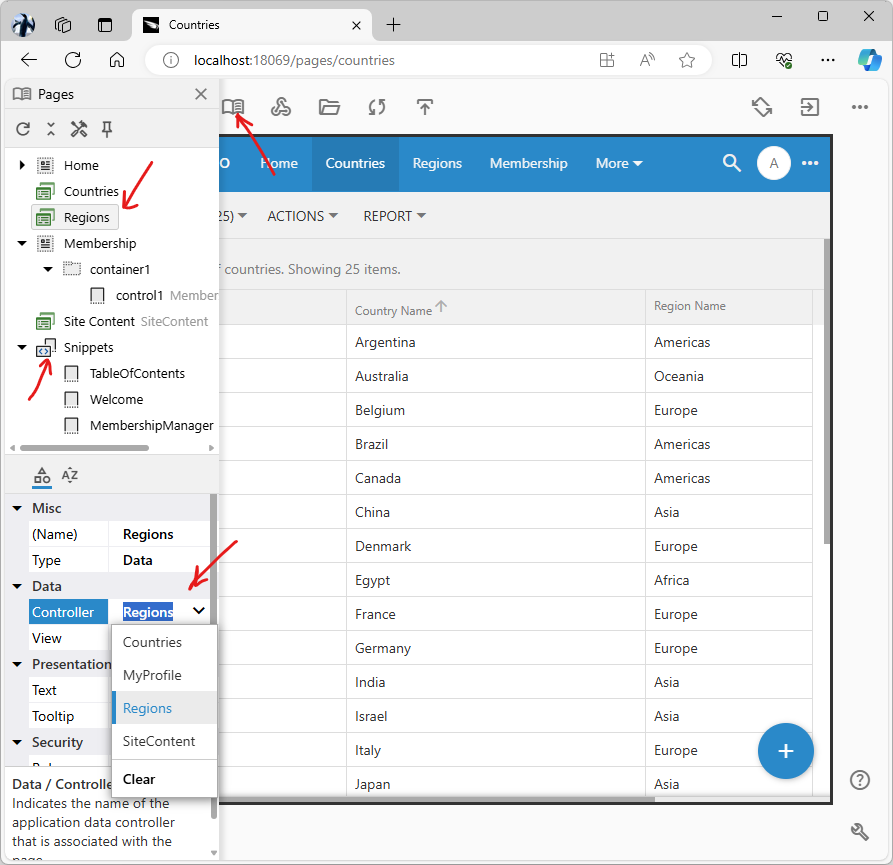
image1.png

More functionality will be added to the Pages hierarchy in the upcoming releases.

Miscellaneous

The following bug fixes and product enhancements are included in this release:

  • (MetaBuilder) The following Oracle-specific system schemas are excluded from the app metadata: XDB, SYSTEM, MDSYS, APEX_, CTXSYS, GSMADMIN_INTERNAL, WMSYS, ORDSYS, ORDDATA, OLAPSYS, LBACSYS.
  • (OAuth2) The OAuth 2.0 handler will handle the situations when there is no response from the authorization server while trying to exchange the authorization code for an access token. Previously a cryptic error message was displayed in the browser. If the app is running on the "localhost" address, then the stack trace is also rendered.
  • (ODP) Users will not be able to enter the associated detail records when creating a new master on the "offline" page, if the primary key of the master does not have a value. Offline Sync assigns automatic primary key values to the new record if the primary is an auto-incremental or Guid column. Users will be able to enter details in this case.
  • (Model Builder) Capitalized table and column names are transformed to Camel notation when the models are created automatically.
  • (OAuth) The read-only fields Auth Uri and Access Token Uri are displayed in the OAuth Identity Consumer form with the Protocol set to 'OAuth 2.0'..
  • Integrated the Oracle ODP.NET in the code generation library. Now apps can be built for Oracle databases without installing any client software.
  • (App Builder) IBD.Data.DB2.iSeries data provider is integrated in the app generator library. The DB2 driver v. 7.1.0 requires additional client components to allow connection to IBM DB2 iSeries databases. The ODP.NET allows connecting to any Oracle database including Oracle i23.
  • (App Studio) The studio runtime recognizes project data requests with hypermedia parameters.
  • (RESTful) The implementation of $app.restful will use the "query" parameters of the hypermedia segment when specified. Previously, only the non-hypermedia requests allowed specifying the query parameters.
  • (TreeView) Adding of the template-based nodes inserts new nodes before the "placeholder" node to ensure correct sequence when multiple "iterate" responses are being added to the parent.
  • (TreeView) Enhanced the node cloning with the option to define the property overrides. For example, the page hierarchy in the App Studio is using the cloned root page with an overridden "iterate" hypermedia path.
  • (TreeView) Expansion of a node that has the pending dynamically loaded children will not remove the "collapse/expand" toggle from the node unless all nodes are resolved and there are no children.
  • (Framework) The empty ResultSet returned by the data controller will not cause an exception when a filter is applied and the field names are not known.
  • (TreeView) The node without 'iterate' definition will have its data inherited from the parent node if its 'inherited' key is set to true.
  • (TreeView) Only a valid icon is assigned to the TreeView nodes. This included material-icon material-symbol or alta-numeric class names are supported.
  • (TreeView) The node definition marked with the dynamic "terminal" expression will prevent the node from being displayed as expandable or replicate the node if the expression evaluates to "true". This allows creating hierarchies that do not require users to expand a node to find out if there are children.
  • (RESTful) The engine adds the ?count=true parameter to the "children-" hypermedia controls.
  • (RESTful) The engine uses the customizable "root" key instead of the hard-coded "root" in the path of the corresponding hypermedia control.
  • (Framework) Filtering expressions are quoted if the expressions consist of the alpha-numeric characters only to avoid conflict of field names with the reserved words of the data engine.
  • (RESTful) The "root-SELF_REFERRING_LOOKUP_FIELD hypermedia is added on any depth of the API. Previously only the root entry had this hypermedia control. Now the "root-" control is added on the first level of the hierarchy in the path.
  • (Framework) Data controllers based on complex custom SELECT statements with the WHERE clause will not cause the app to produce an invalid SQL when the dynamic access control rules are specified or when the user is filtering a many-to-many field.
Sunday, May 19, 2024PrintSubscribe
Authorize With Any IdP, Many-To-Many Fields

OAuth Identity Provider

Code On Time release 8.9.42.0 introduces the new OAuth 2.0 Identity Provider as an application framework component. Developers can configure their apps to authorize users with any OAuth 2.0 compatible authorization server such as Google, Microsoft, Facebook, or another Code On Time app. Applications can authorize users through an open source IdP such as Keycloak to take advantage of SAML and OpenID Connect.

Enhance the user experience with the single sign-on for your public and enterprise apps. Multiple instances of OAuth 2.0 identity provider can be registered in the apps’ content management system.

Developers have an option to create a single app that serves as the identity provider for custom applications built using Code On Time or any other development platform. The dedicated identity provider application delivers the Federated Identity Management for your entire application collection. It is easy to link the identity provider application to any number of OAuth 2.0 authorization servers.

If you have experience setting up an API development tool for OAuth 2.0, you will have little trouble setting up your own applications.

image1.png

The OAuth 2.0 Identity Provider configuration screen of an app running on the 60595 port at the localhost address. This configuration allows using the Northwind demo application as the identity provider.

Many-To-Many Fields

Another highlight of this release includes various improvements to the SQL statement construction at runtime when the many-to-many fields coexist with fields based on formulas. Access Control Rules and user-defined filters are correctly folded to the appropriate block of the SELECT statements.

Summary

The following features and product enhancements are included in this release:

  • (Framework) Filtering of many-to-many fields will not cause an exception when there are formula-based fields that are referencing custom parameters.
  • (Touch UI) The client app does not respond to the resize and orientation change events triggered when the initialization has not finished yet. This may happen in the WebKit browsers, when the browser changes the window layout while the document is still being parsed.
  • (Framework) Business rule developers have access to the UserClaims JSON object representing the id_token from the identity provider that has authorized the current user.
  • (Touch UI) The progress screen message is correctly centered when the app is running in the App Studio mode.
  • (OAuth 2) Multiple instances of OAuth 2.0 Identity Provider can be registered for OAuth 2.0 authorization with any compatible IdP.
  • (OAuth) Error inspection code makes sure that there is a response in the exception. There will be none if the authorization server is not available.
  • (Data Aquarium) The JavaScript expressions specified in Visible When, Read-Only, etc are correctly handling situations when two fields with the same root are being used. For example, the following expressions will not cause the runtime exception anymore:
  • JavaScript
    12this.Field1 != null && this.Field1Suffix != null
    $row.Field != null && $row.Field1Sufix != null
  • (Universal Input) The list-based inputs (radio, listbox) now advance to the next data input when changed if the data field is tagged as lookup-auto-advance.
  • (Universal Input) The Up/Down icon of the DropDownList input now has a transparent background for a better presentation when other inputs have a slight overlap and bleed into its boundaries. The "dropdown" icon of the lookup fields in forms have an opaque background in the Property Grid only.
  • (OAuth) The /oauth2/v2 endpoint is added to the provider URI of a client app if it is not based on App Identity.
  • (CMS) The OAuth2 identity requests are identified in the content description.
  • (OAuth) The settings object embedded in the pages now includes the idP key that represents the dictionary of the display names of the identity providers registered in the content management system The "cached" dictionary is refreshed every fifteen minutes.
  • (REST) The preferred_username claim is set to the username when the profile scope is requested by the client app during the OAuth 2.0 authorization sequence.
  • (CMS) The "Protocol" of an existing identity consumer is read-only when open in the Site Content (app's CMS).
  • (Touch UI) Enhanced the algorithm of toolbar menu fade-in effect.
Wednesday, April 24, 2024PrintSubscribe
Visual Fidelity, Controllers in Studio, etc.

The release 8.9.41.0 includes improvements to the service worker, user interface (UI), data caching, and framework enhancements. Additionally, there are updates to the RESTful API, input handling, and various components like TreeView, property grid, and lookup options. The overall focus of these changes is to enhance the user experience, improve performance, and ensure compatibility with latest technologies.

Enhanced Rendering of Forms

Switching between the read-only and editable state in a form will not cause layout shifting. The styling of universal inputs was adjusted to ensure the high fidelity of presentation. The asterisk displayed next to the labels of the editable fields is now rendered as a Material Symbols icon. Every form will look better when the app is regenerated with the new release.

image1.png

Controllers Hierarchy in App Studio

We have completed the Controllers hierarchy configuration and implemented a robust set of “field” properties. Developers can inspect the UI of the live app and jump to the relevant configuration element. Changes to the “field” property values in the Properties Window are persisted to the project design and data controllers.

image2.png

Make sure to inspect the hierarchy of your own projects. If you do find any inconsistencies, then please report them with the screenshots in a support ticket.

If you do make changes in the App Studio, then make sure to restart the app generator if you need to use the legacy Project Designer.

The next release will introduce the drag and drop manipulation of the hierarchy nodes and more editable properties.

Miscellaneous

The following enhancements are included in the release 8.9.41.0:

  • (PWA) The service worker will attempt to cache the response that has the http(s) schema only. The requests from the browser extensions to fetch resources from other schemas are ignored.
  • (Touch UI) The "required" fields are now displaying an asterisk based on a Material Symbols icon.
  • (Touch UI) The multi-line read-only text fields do not have the margin at the bottom.
  • (Touch UI) The "chevron" button in the lookup input has its top margin matching the natural top margin of the text value.
  • (Touch UI) Reduced the excessive bottom margin of the "read-only" form fields.
  • (Touch UI) Restored the visibility of the "View Details" button displayed next to the lookup fields.
  • (ACL) The "read '' permission on the data controllers now works with any kind of data. The framework does not change the SQL when selecting data. Instead the ViewPage instance removes the fetched data from the output. The Access Control List will have its own section in the App Studio in the future releases.
  • (Touch UI) The alternative view options are presented as the standard items in the sidebar. The previous releases rendered them as the TreeView items.
  • (Framework) The SQL "insert" statement will include the "default" expressions of the fields if the field value is not specified.
  • (Framework) The filter expressions are included in the resultset when a resultset is required to construct a SELECT statement. This allows creating dynamic access control rules and view-level filter expressions that work with the filtering of many-to-many inputs. Previously the filters were incorrectly included in the outer SELECT statement.
  • (Framework) Adding a virtual field without a formula will not break the filtering of many-to-many fields.
  • (Framework) Introduced the StorageServiceVersion property in the AzureBlobAdapterBase class. Developers can override the storage API version in the partial declaration of the AzureBlobAdapater class of their own project.
  • (Framework) The Azure blob adapter is now using the 2023-11-03 version of API.
  • (Touch UI) The input footer takes up to 90% of the available width if there is a text action associated with the input. value.
  • (Touch UI) Updated the icons to the latest Google Material Symbols. App Studio will allow a visual selection of icons in the relevant properties of application configuration elements.
  • (App Studio) The changes to the content in the Property Grid will trim the GET cache depth to 3 levels. This ensures fresh data fetched from the server.
  • (REStful) The $app.restful API optimizes the GET cache cleanup performed when the other HTTP methods are executed on any resource.
  • (Universal Input) The 'input' event triggered on a text input will clear the 'keepFocus' flag. This enables pasting the field values through the system context menu in the Property Window of the App Studio.
  • (TreeView) A notification with the text of the error and node template definition is displayed when the TreeView instance fails to create a node.
  • (Prop Grid) Boolean properties may have a custom list of values.
  • (Prop Grid) The configuration of properties allows custom lookup options such as the lookup-accept-any-value tag. Previously the property grid was overriding the custom definition with the lookup-null-value-none tag. App Studio uses custom lookup options in the definitions of some fields.
  • (TreeView) If the "related" node contains the selected child then the replacement of the related node "inner" content is performed. Otherwise the new node is created in the place of the original "related" node.
  • (Touch UI) The TreeView instance will trigger the "get" event to request data when a "related" node needs to be refreshed after a change to another node.
  • (App Studio) Enhanced algorithm of data field inspection will lead to the field definition in the view.
  • (Touch UI) Improved the algorithm of the toolbar menu positioning when the number of visible app toolbar buttons is changed in response to the user selection of data items.
  • (Framework) Moved AccessControllList from BusinessRules.cs|vb to Common.cs|vb.
  • (Touch UI) Removed the excessive height of the fields in the read-only mode.
  • (Touch UI) Wide notifications appear within the app boundaries in the App Studio mode.
  • (TreeView) By default, the TreeView does not track the last selected node.
  • (PropGrid) The property grid constructs the TreeView with the option to track selection.
  • (CMS) The content with no value in the Path will open correctly in “edit” mode when selected.
Labels: Release Notes