User Interface

Labels
AI(21) AJAX(112) App Studio(10) Apple(1) Application Builder(245) Application Factory(207) ASP.NET(95) ASP.NET 3.5(45) ASP.NET Code Generator(72) ASP.NET Membership(28) Azure(18) Barcode(2) Barcodes(3) BLOB(18) Business Rules(3) Business Rules/Logic(140) BYOD(13) Caching(2) Calendar(5) Charts(29) Cloud(14) Cloud On Time(2) Cloud On Time for Windows 7(2) Code Generator(54) Collaboration(11) command line(1) Conflict Detection(1) Content Management System(12) COT Tools for Excel(26) CRUD(1) Custom Actions(1) Data Aquarium Framework(122) Data Sheet(9) Data Sources(22) Database Lookups(50) Deployment(22) Designer(178) Device(1) Digital Workforce(3) DotNetNuke(12) EASE(20) Email(6) Features(101) Firebird(1) Form Builder(14) Globalization and Localization(6) HATEOAS(12) How To(1) Hypermedia(3) Inline Editing(1) Installation(5) JavaScript(20) Kiosk(1) Low Code(3) Mac(1) Many-To-Many(4) Maps(6) Master/Detail(36) Micro Ontology(5) Microservices(4) Mobile(63) Mode Builder(3) Model Builder(3) MySQL(10) Native Apps(5) News(18) OAuth(9) OAuth Scopes(1) OAuth2(14) Offline(20) Offline Apps(4) Offline Sync(5) Oracle(11) PKCE(2) Postgre SQL(1) PostgreSQL(2) PWA(2) QR codes(2) Rapid Application Development(5) Reading Pane(2) Release Notes(186) Reports(48) REST(29) RESTful(33) RESTful Workshop(14) RFID tags(1) SaaS(7) Security(81) SharePoint(12) SPA(5) SQL Anywhere(3) SQL Server(26) SSO(1) Stored Procedure(4) Teamwork(15) Tips and Tricks(87) Tools for Excel(3) Touch UI(93) Transactions(5) Tutorials(183) Universal Windows Platform(3) User Interface(337) Video Tutorial(37) Web 2.0(100) Web App Generator(101) Web Application Generator(607) Web Form Builder(40) Web.Config(9) Workflow(28)
Archive
Blog
User Interface
Monday, June 4, 2012PrintSubscribe
Disabling Samples in Adaptive Filters

Column header dropdowns display a list of filtering samples. These samples can be used to quickly filter the data by a single value. The filters adapt to each other.

Last Name column dropdown displaying filter samples.

This feature can be disabled.

Start the Project Designer. In the Project Explorer, double-click on Employees / container1 / view1 / LastName data field node.

LastName data field on grid1 of Employees page.

Make the following change:

Property New Value
Search Mode
$disablesamples

Press OK to save the data field. On the toolbar, press Browse.

When the web application opens in the web browser, navigate to Employees page. Click on the header for Last Name column. There will not be any filtering samples present.

Last Name column header dropdown not displaying any filter samples.

Monday, June 4, 2012PrintSubscribe
Search Options Disable Multiple Values

The dropdown under each column header has the “Filter…” option.
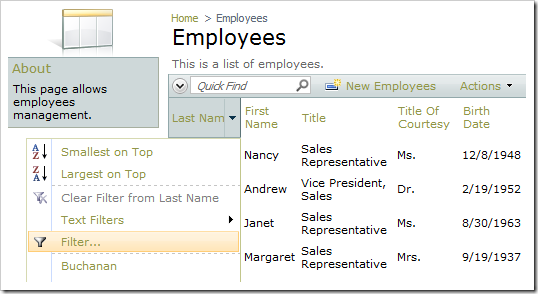
Multiple Value Filter option for Last Name column.

When clicked, it displays a check box list of filter values for the field. The user can then filter the field with multiple values.
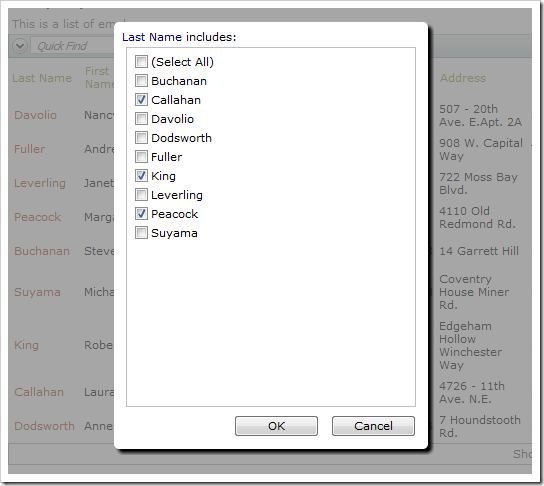
Multiple Values selected for filtering on the Last Name field.

This feature can be disabled.

Start the Project Designer. In the Project Explorer, double-click on Employees / container1 / view1 / grid1 / LastName data field node.
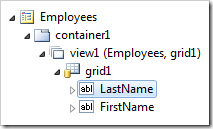
LastName data field of grid1 view of Employees page.

Change the Search Mode property:

Property New Value
Search Mode
$disablemultiplevalues

Press OK to save the data field. On the toolbar, press Browse.

Navigate to the Employees page and activate the header dropdown for Last Name column. The “Filter…” option will not be available.
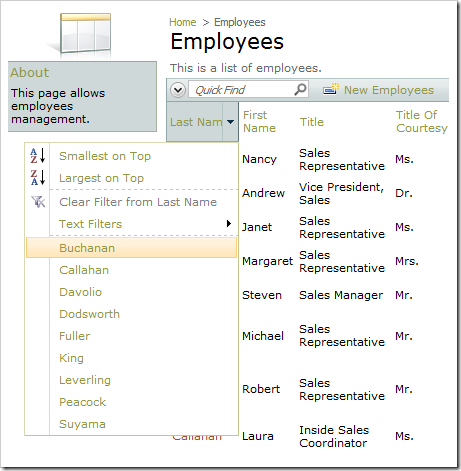
Multiple Value Filter option under Last Name column dropdown is not available.

Monday, June 4, 2012PrintSubscribe
Disabling Auto Complete in the Search Bar

The Advanced Search Bar enables auto complete for the text fields.

Last Name search field with Auto Complete enabled.

The feature may be disabled when necessary.

Start the Project Designer. In the Project Explorer, double-click on Employees / container1 / view1 / grid1 / LastName data field node.

LastName data field on 'view1' of Employees controller.

Make the following change:

Property New Value
Search Options
$disableautocomplete

Press OK to save the data field. On the toolbar, press Browse to generate the application.

When a web browser window opens, navigate to Employees page and open the advanced search bar. The Last Name search field no longer has Auto Complete capabilities enabled.

Last Name search field with Auto Complete disabled.