Database Lookups

Labels
AI(13) AJAX(112) App Studio(10) Apple(1) Application Builder(245) Application Factory(207) ASP.NET(95) ASP.NET 3.5(45) ASP.NET Code Generator(72) ASP.NET Membership(28) Azure(18) Barcode(2) Barcodes(3) BLOB(18) Business Rules(3) Business Rules/Logic(140) BYOD(13) Caching(2) Calendar(5) Charts(29) Cloud(14) Cloud On Time(2) Cloud On Time for Windows 7(2) Code Generator(54) Collaboration(11) command line(1) Conflict Detection(1) Content Management System(12) COT Tools for Excel(26) CRUD(1) Custom Actions(1) Data Aquarium Framework(122) Data Sheet(9) Data Sources(22) Database Lookups(50) Deployment(22) Designer(178) Device(1) Digital Workforce(3) DotNetNuke(12) EASE(20) Email(6) Features(101) Firebird(1) Form Builder(14) Globalization and Localization(6) HATEOAS(4) How To(1) Hypermedia(3) Inline Editing(1) Installation(5) JavaScript(20) Kiosk(1) Low Code(3) Mac(1) Many-To-Many(4) Maps(6) Master/Detail(36) Micro Ontology(5) Microservices(4) Mobile(63) Mode Builder(3) Model Builder(3) MySQL(10) Native Apps(5) News(18) OAuth(9) OAuth Scopes(1) OAuth2(13) Offline(20) Offline Apps(4) Offline Sync(5) Oracle(11) PKCE(2) Postgre SQL(1) PostgreSQL(2) PWA(2) QR codes(2) Rapid Application Development(5) Reading Pane(2) Release Notes(185) Reports(48) REST(29) RESTful(31) RESTful Workshop(15) RFID tags(1) SaaS(7) Security(81) SharePoint(12) SPA(6) SQL Anywhere(3) SQL Server(26) SSO(1) Stored Procedure(4) Teamwork(15) Tips and Tricks(87) Tools for Excel(3) Touch UI(93) Transactions(5) Tutorials(183) Universal Windows Platform(3) User Interface(338) Video Tutorial(37) Web 2.0(100) Web App Generator(101) Web Application Generator(607) Web Form Builder(40) Web.Config(9) Workflow(28)
Archive
Blog
Database Lookups
Saturday, April 25, 2009PrintSubscribe
In-Place Creation of Lookup Items

Data Aquarium Framework features on-demand creation of lookup items.

See it in Action

On the screen shot below a user has selected Edit command in context menu of a grid row that lists products from Northwind sample database.
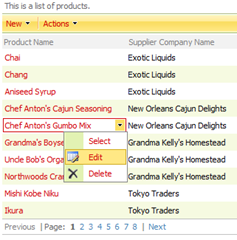
Context-Sensitive Popup Menu

The row is now displayed in edit mode. You can see that supplier company name field has an icon  right next to the lookup box.

New Lookup Item Icon

Row With Lookups That Allow In-Place Item Creation

A click on this icon will bring up New Suppliers modal dialog that allows entering a supplier in-place. The supplier is automatically selected in the lookup when user clicks OK button.
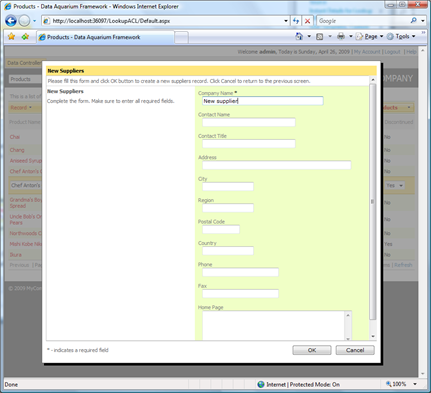
In-Place Lookup Item Creation

You can try this online at http://dev.codeontime.com/demo/nwblob.

Controlling Access to This Feature

The feature is extremely useful but shall not be left uncontrolled. Typically only certain categories of users are allowed to create new lookup items.

This is how the creation of new lookup items is turned on in the data controller definition files.

<field name="SupplierID" type="Int32" label="Supplier#">
  <items style="Lookup" dataController="Suppliers" newDataView="createForm1" />
</field>

Attribute newDataView of items element specifies the view defined in data controller identified by dataController attribute. The attribute value is automatically assigned by Code OnTime Generator. You can define a custom view in Suppliers data controller to provide an alternative form to create new suppliers.

If you don’t want in-place lookup item creation to to be enabled then simply delete the attribute.

Controlling in-place lookups With Roles

A better solution is to allow only certain user roles to create new lookup items.

Open data controller ~/Controllers/Suppliers.xml and modify New Suppliers action as follows:

<actionGroup scope="ActionBar" headerText="New">
  <action commandName="New" commandArgument="createForm1" 
        headerText="New Suppliers" 
description="Create a new Suppliers record." roles="Administrators"/> </actionGroup>

Attribute roles will enable this action to be executed by users with Administrators role only. The framework will make sure that there is an action with New command in Suppliers data controller with an argument matched to the view specified by newDataView attribute of items element. If such action is not available then in-place creation of lookup items is automatically disabled.

Our sample application has been generated with ASP.NET Membership enabled. Here is how the row will look if we sign in a user with the standard name user. This user belongs to the role Users and is not authorized to create new suppliers.
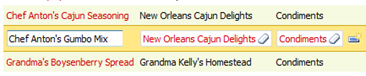
Affect Of Action Roles on Lookups

You can see that the icon that allows creating new suppliers is gone. The user still can create new categories.

The centralized business logic and definitions of Data Aquarium Framework ensure that any other references to the Suppliers lookup in the application are affected as well.

This is how the supplier screen will look when displayed to the same user. Notice that New option is not available on the action bar anymore.
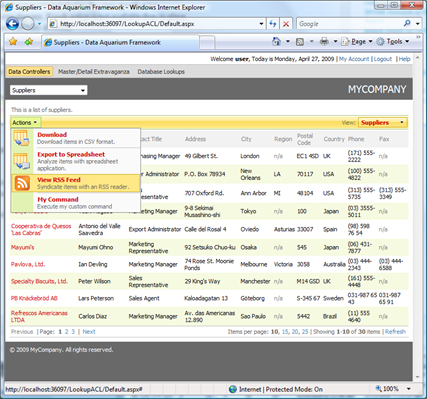
Global Effect Of Roles

Conclusion

ASP.NET declarative security if fully integrated into Data Aquarium Framework and allows easy control over AJAX web applications of any complexity.

Thursday, November 27, 2008PrintSubscribe
Instant Details for Lookup Fields

Data Aquarium Framework provides powerful data lookup capabilities. We have extended them one step further by offering instant details for lookup fields.

Navigate to http://dev.codeontime.com/demo/nwblob, select Products in the drop down in the left top corner and select any product. Notice that an arrow is displayed next to Product Name field. The view component has detected that Product Name is defined as a lookup field and displayed an instant details link.

image

Click on the arrow and a Details page for Manjimup Dried Apples product will be presented.

image

Notice that instant details arrows are also displayed next to Supplier Company Name field and Category Name field. Follow category name link and the next level of details is presented.

image

You can rename the category, change description or upload a new image. As soon as you save the changes or click on Close button you will returned back to the product instant details. Click Close button on products instant details and you are back on the page with the order details.

In just a few clicks you can jump straight to the details of the lookup data and make necessary adjustments or research. The same details preview is available when you jump to item details displayed in RSS data feeds of your ASP.NET web application.

Monday, August 18, 2008PrintSubscribe
Bug Fixes

Database lookups were incorrectly clearing the selected value in response to a click on eraser icon. The problem has been fixed.

Pager in detail grid views was not displaying a page size menu even if the number of detail records is significant. The problem has been fixed.